AI
jeo-code Puts Skills and Approval Gates Around Coding Agents
An affiliated overview of jeo-code’s skill-driven workflow, approval gates and proposed use cases, with a measurement plan instead of unverified productivity promises.

What If Your Coding Agent Came with Its Own Skill Tree?
My interest is in the harness: the scaffolding, approval boundaries and feedback loops around a coding agent. This article describes that design direction, not a controlled comparison of developer productivity.
That question stuck with me: What if the harness itself was the product?
Enter jeo-code — and its companion jeo-skills.
I maintain the linked jeo-code and jeo-skills projects. This is an affiliated overview, not an independent product review. The retained feature and catalog descriptions are historical context, not a verified current installation guide; check the linked repositories before following commands.
Curiosity: Can reusable skills and explicit approval gates make repeated engineering tasks easier to inspect and reproduce?
Technical Analysis: What Is jeo-code?

jeo-code (jeo on the CLI) is a pure-TypeScript AI coding agent that runs on Bun (≥ 1.3.14) with zero native dependencies. It features a Spec-first workflow, deep-interview Socratic capabilities, robust TUI with TMA (tmux) integrations, and native Ouroboros compatibility. You run it inside any repository, and it reads files, edits them, executes commands, and drives tasks to completion.
Its standout feature is the gjc-style flat inline stack TUI: completed work flushes into scrollback as glyph-led ledger lines and bordered tool cards, avoiding scrollback flooding and allowing terminal mouse-wheel scrolling mid-turn. It also supports seamless clipboard image paste (Ctrl+V) across macOS and Linux, sending images as true multimodal input on every provider.
But the design philosophy is what sets it apart.
The Five Harness Principles Baked In
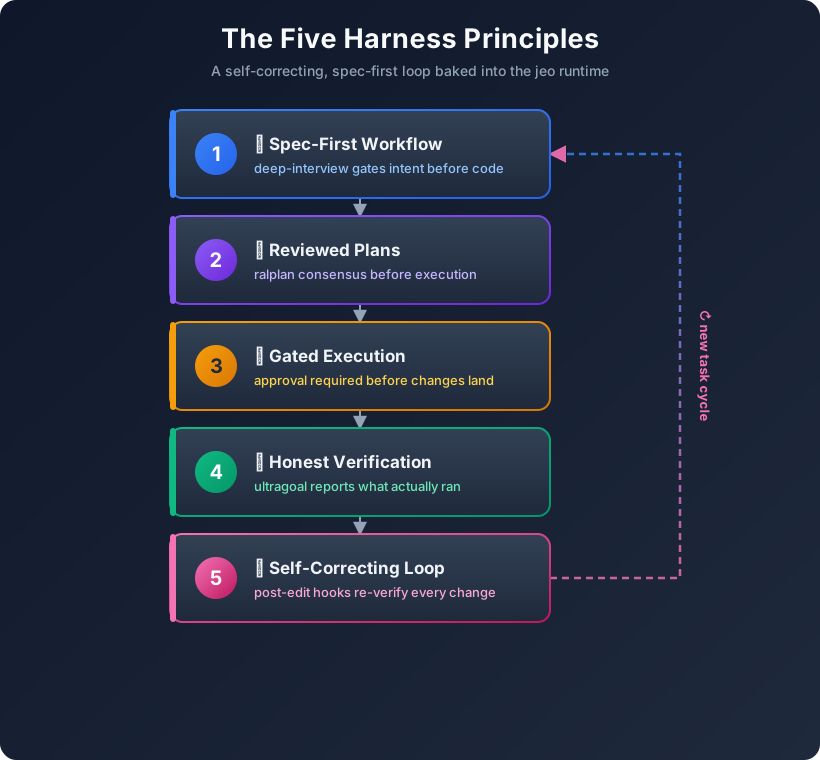
| Principle | What It Means | Why It Matters |
|---|---|---|
| Spec-First | Requirements interview before execution | Make ambiguous requirements explicit |
| Reviewed Plans | A critic reviews the proposed plan | Keep a review decision available for inspection |
| Gated Execution | An approval step before execution | State who may authorize the work |
| Honest Verification | Completion claims checked against test output | Retain evidence, including failures |
| Self-Correcting Loop | Post-edit diagnostics returned to the agent | Make errors available for another iteration |
Multi-Provider, One Loop
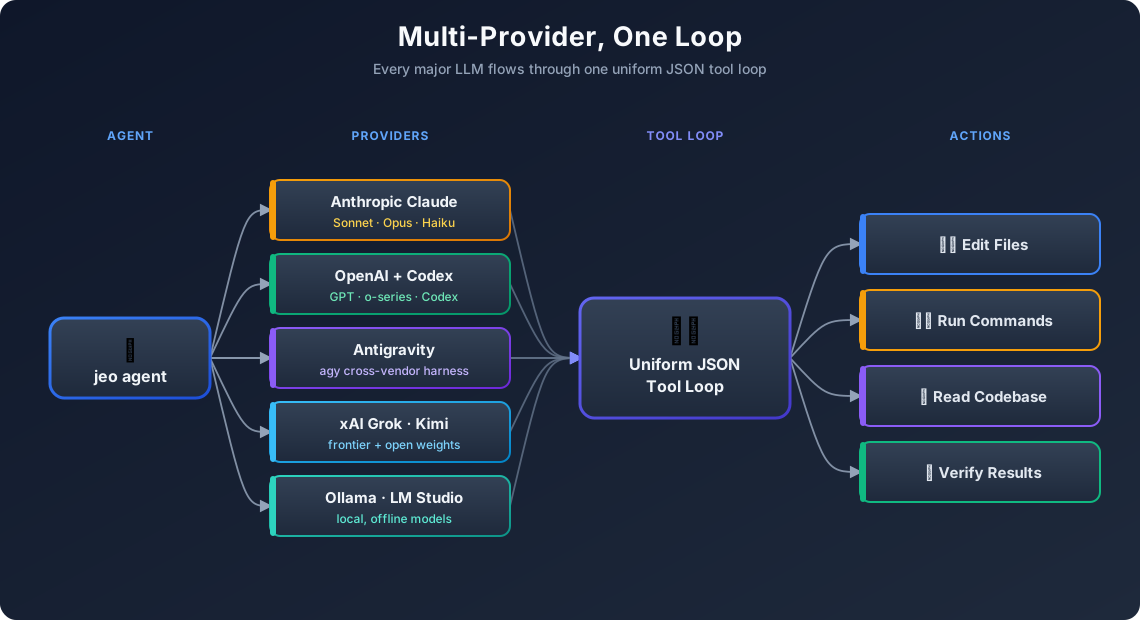
One agent loop, every major LLM. Switch providers with /provider login <name> from the input box — the choice persists as the new default.
The TUI That Doesn’t Get in Your Way
1
2
3
4
jeo                                    # interactive agent in your repo
jeo "refactor auth module + run tests" # one-shot
jeo --tmux                             # isolated tmux session
jeo doctor                             # check config + model connection
| Action | Shortcut |
|---|---|
| Slash command palette | / + Tab |
| Run a skill workflow | $<skill> [intent] |
| Direct shell command | !<command> |
| Recall previous queries | ↑ / ↓ (persisted in .jeo/input-history) |
| Expand last response | Ctrl+O |
| Paste clipboard image | Ctrl+V |
See It In Action
A promotional overview accompanies the workflow description. Treat it as an illustration, not a measurement of developer productivity:
Full demo and install guide → docs/usage-guide.md
And here is the Remotion-animated promo rendered as React code for this post — 4 scenes, 300 frames at 30fps, 1920×1080:
The Remotion source lives at
tools/jeo-promo-video/src/JeoPromo.tsxin this blog’s repo.
Where It Gets Powerful: jeo-skills
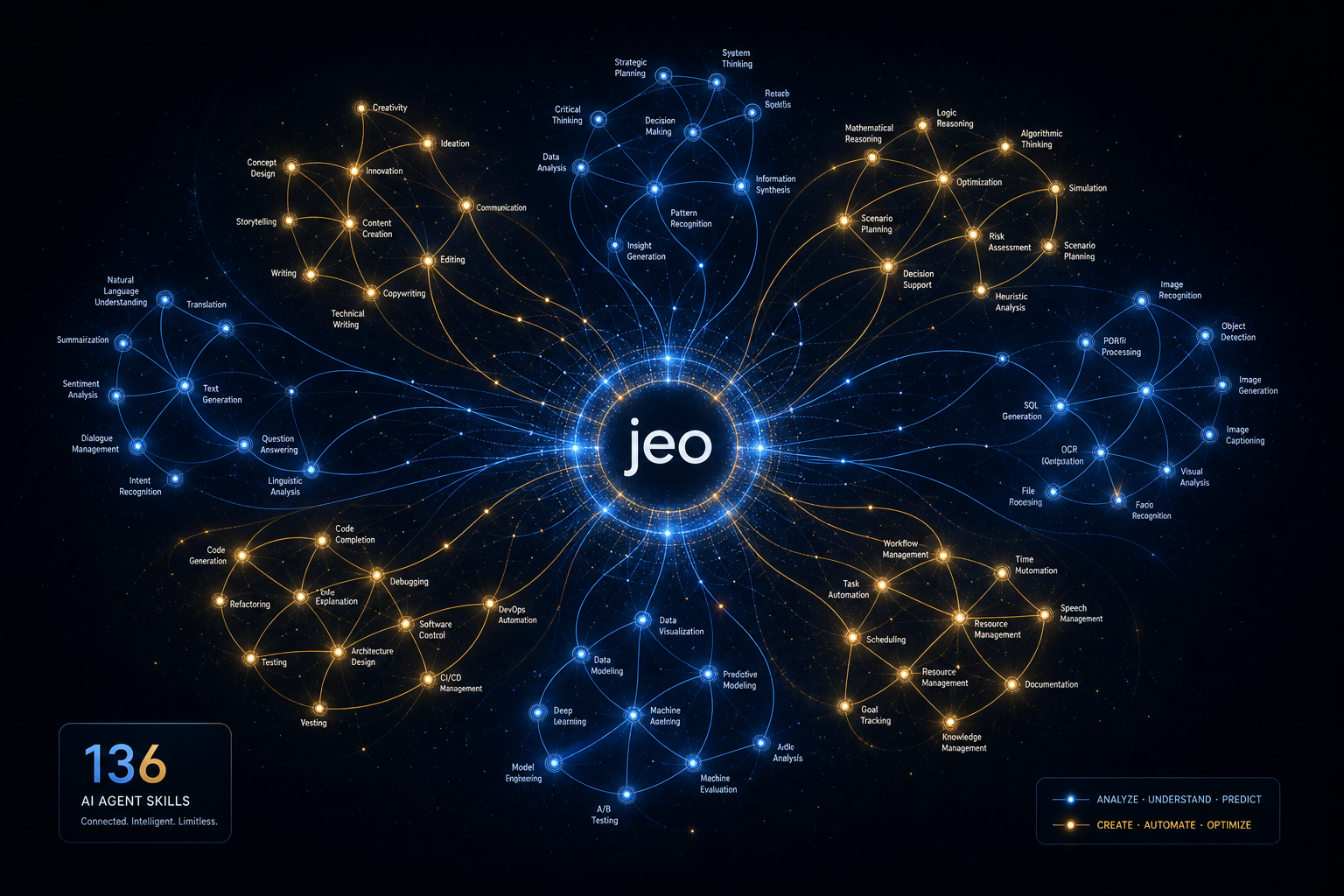
The harness engine alone is powerful. With jeo-skills, it becomes genuinely formidable.
jeo-skills is a curated collection of 146 installable skill folders for LLM-based development workflows. Each skill is a SKILL.md that tells the agent exactly which tools to use, which patterns to apply, and which route-outs to respect — so the agent stops guessing and starts shipping.
Install Any Skill in One Command
1
2
3
4
5
# Install a specific skill
npx skills add https://github.com/akillness/jeo-skills --skill scrapling

# Install the whole library at once
git clone https://github.com/akillness/jeo-skills.git && bash jeo-skills/install.sh
The Skill Ecosystem Map
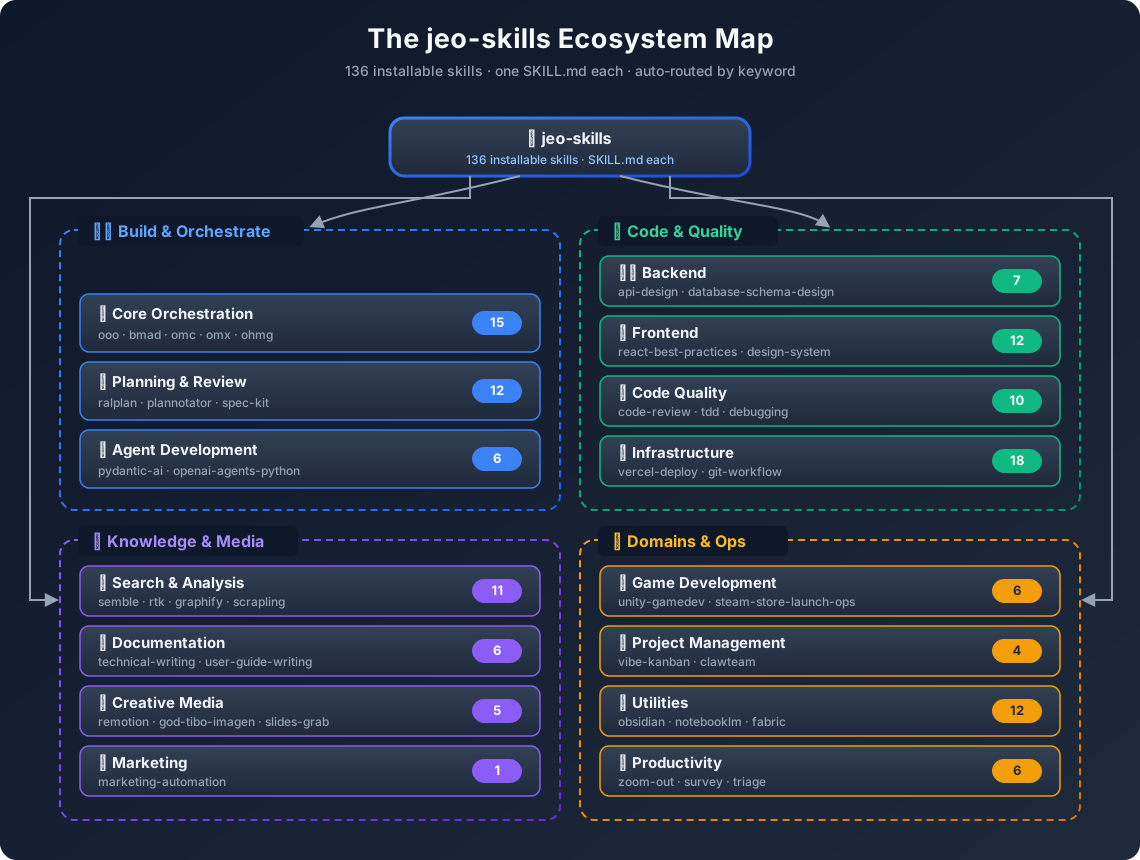
146 Skills Across Every Domain
| Category | Skills (sample) | Count |
|---|---|---|
| 🏗️ Orchestration | ooo, bmad, plannotator, team, ultrawork, autopilot | 12 |
| 🔬 Research | deep-dive, llm-wiki, autoresearch, graphify, scrapling | 9 |
| ⚙️ Dev Workflow | tdd, debugging, code-review, git-workflow, spec-kit | 18 |
| 🎬 Media & Visual | remotion-video-production, god-tibo-imagen, slides-grab | 8 |
| 🎮 Game Dev | unity-gamedev-skill-pack, game-performance-profiler, game-ci-cd-pipeline | 6 |
| ☁️ Platform | firebase-ai-logic, supabase-agent-skills, vercel-deploy, genkit | 11 |
| 🤖 AI Agents | crewai-multi-agent, openai-agents-python, pydantic-ai, clawteam | 14 |
| 📊 Data & Analytics | data-analysis, looker-studio-bigquery, langsmith, opik | 9 |
| 🔒 Quality & Security | ultraqa, security-best-practices, backend-testing, web-accessibility | 12 |
| … and more | okf, obsidian, compresso, rtk, semble, graphify | 47 |
| Total | 146 |
Key Takeaways: A Workflow That Can Be Evaluated
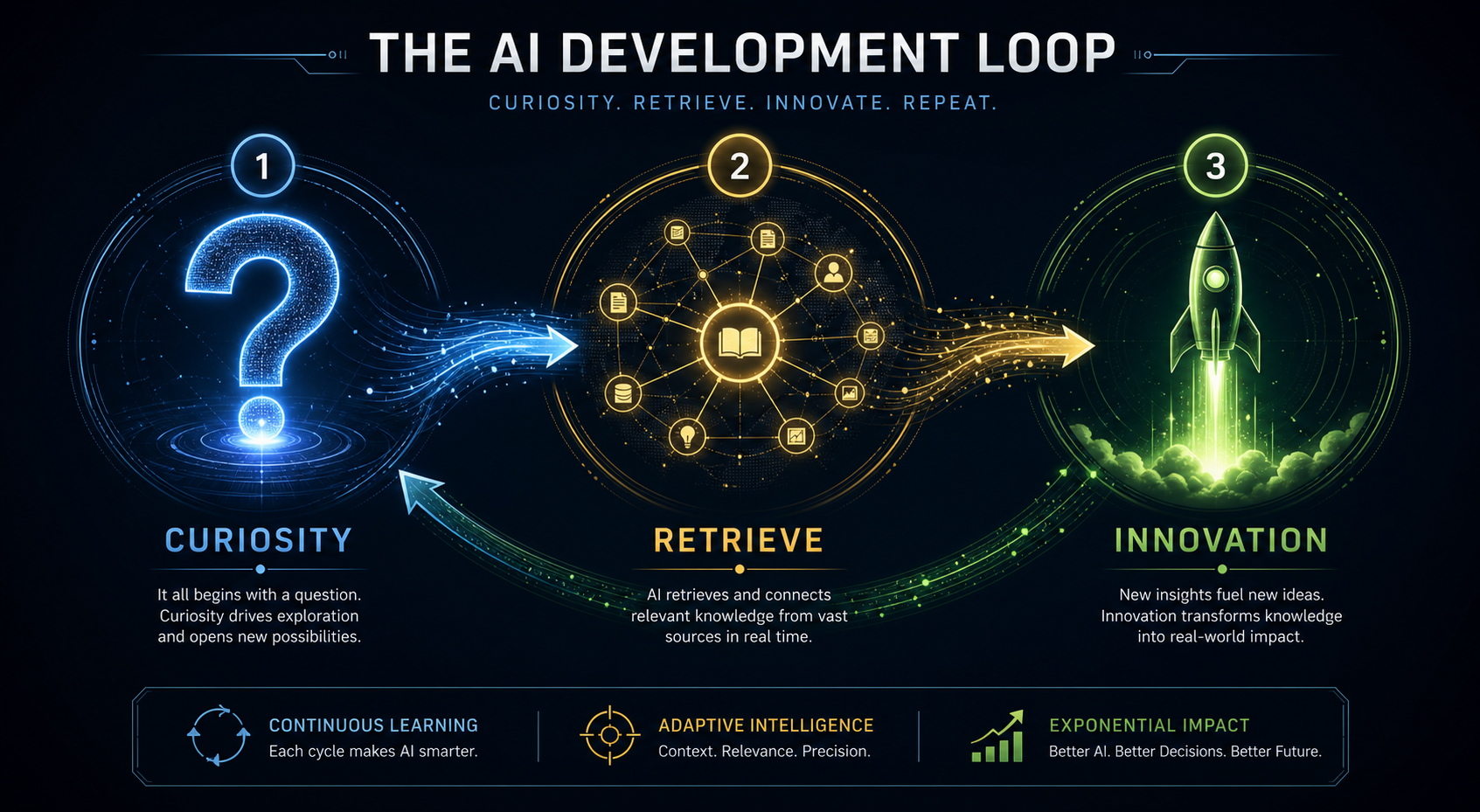
The real insight isn’t “jeo runs your AI.” The insight is what changes about how you think when you have a trustworthy harness.
The Builder’s Flywheel
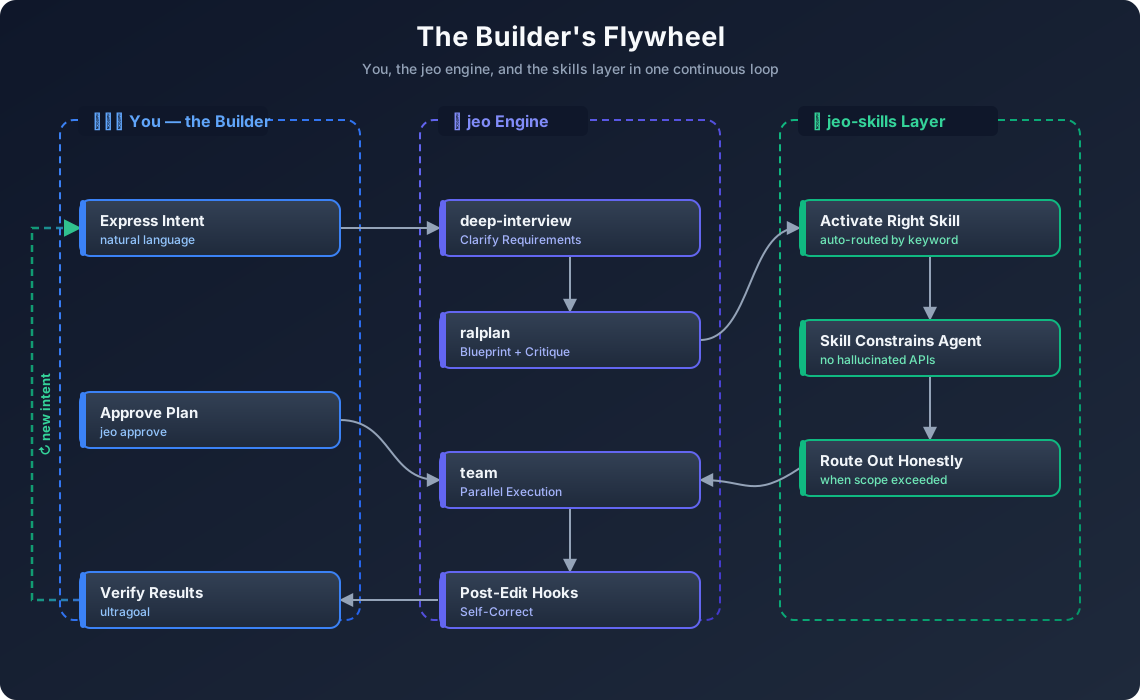
Use Cases
These are illustrative scenarios, not measured delivery reports. The questions, task split and time required depend on the repository, model and acceptance criteria.
🎮 Use Case 1: Game Feature Development
Scenario: Ship a new procedural level system for a mobile RPG.
1
2
jeo "design and implement a wave-function-collapse dungeon generator
     using existing TileMap class, integrate with GameManager, test on device spec"
What happens:
deep-interviewasks 8 clarifying questions (tile types? seeding strategy? fallback for impossible states?)ralplangenerates a 3-phase blueprint, critic subagent signs off with[OKAY]jeo approvegates until you read and confirmteamspawns executor subagents: one for WFC algorithm, one for GameManager integration, one for unit tests- Post-edit hook runs
tsc && jest --coverage, errors fed back to the agent, fixed in-loop ultragoalverifies all acceptance criteria against real suite output
With unity-gamedev-skill-pack: The agent knows Unity’s project structure, avoids serialization pitfalls, and cites the Unity docs it’s working from.
🔬 Use Case 2: Research → Production Pipeline
Scenario: Implement a RAG-based player-support bot from a recent paper.
1
2
jeo "$deep-dive implement context-aware retrieval system from arxiv 2506.xxxxx
     for our player support knowledge base"
What happens:
deep-diveactivates — traces causal hypotheses, crystallizes requirementsllm-wikicaptures findings into~/vaults/llm-wiki/for durable memorygraphifybuilds a knowledge graph of the system architecturescraplingfetches and parses the arxiv paper + related GitHub reposralplanblueprints the implementation with honest tradeoff tablesteambuilds the retrieval layer, embedding pipeline, and eval harness
What to measure: record research, implementation and review time for the same acceptance criteria. This scenario has no measured time-saving result.
🎬 Use Case 3: Marketing Content at Code Speed
Scenario: Generate a promotional video + blog post for a new AI feature launch.
1
jeo "create a Remotion promo video + blog post for our new matchmaking AI feature"
What happens:
remotion-video-productionskill activates — plans scenes, animation budget, asset listgod-tibo-imagengenerates missing hero images via Codex backend (no extra API key)- Remotion compositions rendered at 1920×1080 as MP4
- Blog post authored with crisp SVG workflow diagrams, embedded video, GitHub links
vercel-deployor Jekyll build deploys the post
This article includes diagrams and promotional media. Those artifacts do not establish that an agent completed the end-to-end scenario above.
What the Workflow Should Make Explicit
These are evaluation questions, not a claim that other coding agents lack the same capabilities.
| Design concern | Question to check on a real task |
|---|---|
| Requirements | Were the acceptance criteria written before execution? |
| Approval | Did the executed steps stay within the approved scope? |
| Verification | Can each completion claim be traced to actual test output? |
| Recovery | Can a fresh session recover the relevant state and evidence? |
| Provider choice | Does the selected provider support the tools and inputs required? |
| Skill fit | Did the selected procedure help this task, or cause rework? |
Architecture Deep Dive
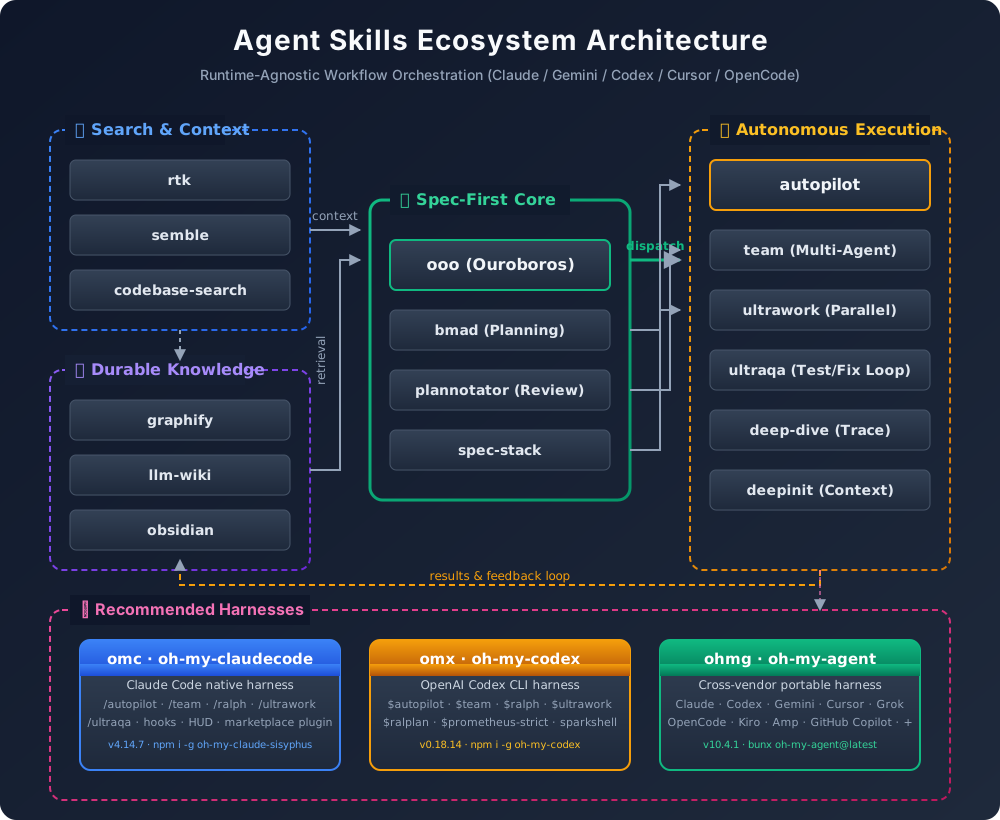
The jeo-skills architecture diagram shows how skills, harnesses, and the jeo loop interconnect:
How a Skill Execution Works
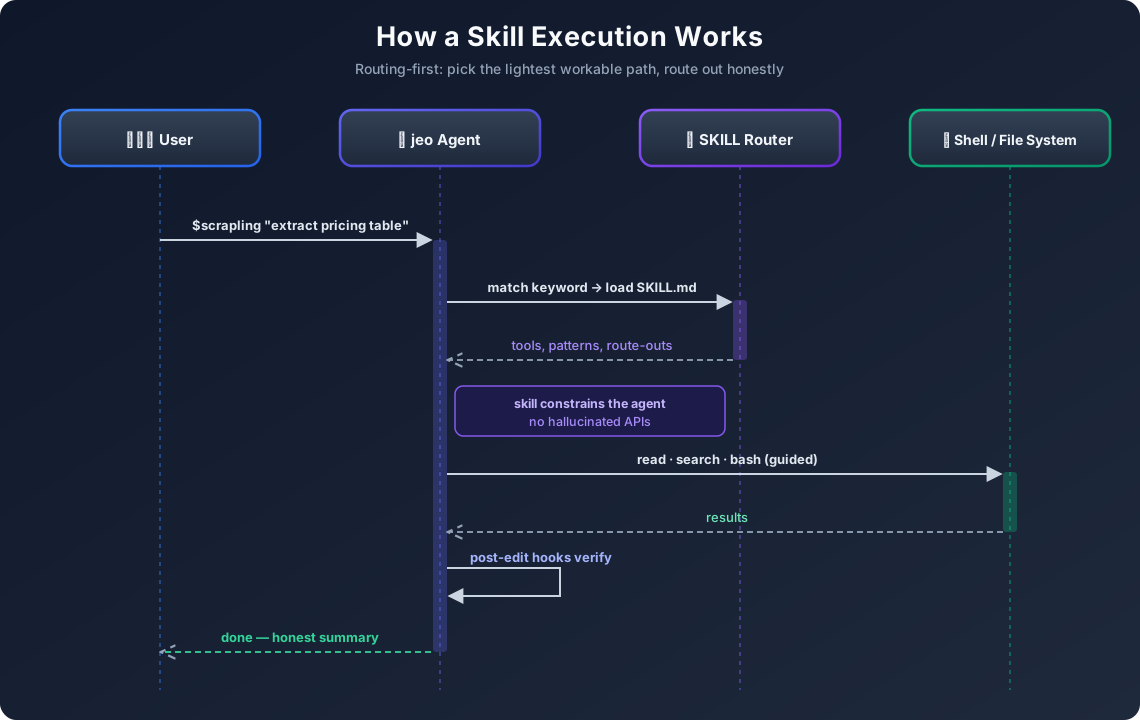
Every skill is routing-first: picks the lightest workable path, routes out honestly if scope is exceeded. No over-promising. No silent failures.
Installation & Quick Start
Method 1 — Bun (recommended, fastest startup)
1
2
3
4
5
6
7
8
# Install Bun runtime
curl -fsSL https://bun.sh/install | bash

# Install jeo-code globally
bun install -g jeo-code

# Verify
jeo --version
Method 2 — npm (universal Node.js)
1
2
3
4
5
# Install globally (requires Node.js 18+)
npm install -g jeo-code

# Or run once without installing
npx jeo-code
Connect Your LLM Provider (required)
jeo-code supports every major LLM. Run jeo doctor first to see connection status, then log in to your preferred provider:
1
2
3
4
5
6
7
8
9
10
11
12
13
14
# Diagnose connection status
jeo doctor

# Anthropic (Claude)
jeo /provider login anthropic
# → prompts for ANTHROPIC_API_KEY

# OpenAI (GPT / Codex)
jeo /provider login openai
# → prompts for OPENAI_API_KEY

# Ollama (local, free — no API key needed)
ollama serve          # in a separate terminal
jeo /provider login ollama
Tip:
/provider login <name>also works from inside the jeo interactive TUI — no need to restart.
Install All 146 jeo-skills
The fastest way — let your LLM agent install them for you. Hand this prompt file to any agent (jeo, Claude Code, Codex, Cursor…) — it reads the instructions and installs every skill automatically:
# Send to your LLM agent — it will read and install automatically
curl -s https://raw.githubusercontent.com/akillness/jeo-skills/main/setup-all-skills-prompt.md
Prefer to do it by hand? The classic clone-and-run path still works:
1
2
3
4
5
6
7
# Manual full install
git clone https://github.com/akillness/jeo-skills.git
cd jeo-skills && bash install.sh
# → creates 146 skill folders in ~/.agents/skills/

# Verify
ls ~/.agents/skills/ | wc -l   # → 146
Run jeo
1
2
3
4
5
6
7
8
# Interactive mode
jeo

# One-shot with a skill prefix
jeo "$deep-dive explain the architecture then refactor the auth module"

# Check your skill library
ls ~/.agents/skills/ | wc -l   # → 146
How to Measure the Difference
No controlled productivity benchmark is supplied in this article. The earlier setup-time and speed rankings have been withdrawn. A useful comparison would run the same tasks under the same model, budget and acceptance tests, both with and without the skill layer.
| Metric | Definition | Evidence to retain |
|---|---|---|
| Setup effort | Active time required before the first valid run | Setup log and environment versions |
| Completion time | Wall-clock time and human intervention time | Timestamped run record |
| Correctness | The same acceptance tests for every approach | Full test results, including failures |
| Rework | Corrections needed after the first proposed completion | Review findings and patches |
| Cost | Provider usage plus review effort | Usage records and stated accounting method |
| Repeatability | Variation across repeated fresh runs | Per-run results, not only the best run |
A workflow may help one task and hurt another. Until those measurements exist, a productivity multiplier is unknown.
Engineering Judgments, Not Performance Results
My experience in production game AI suggests three design priorities. These are engineering judgments, not measured outcomes from using jeo-code:
1. Gates beat guidelines. Telling an agent “be careful” does nothing. A gate that blocks done until ultragoal passes — that’s a mechanical constraint that actually works.
2. Skills encode institutional knowledge. Each skill in jeo-skills is a distilled answer to “what does an expert do when they encounter this?” Agents with skills don’t reinvent — they apply. The difference is the same as a junior developer Googling vs a senior who already knows the answer.
3. Reuse needs evaluation. A reusable workflow can reduce repeated setup, but stale or poorly matched instructions can also create rework. Test that trade-off on the tasks you actually repeat rather than assuming a gain.
New Questions This Raises
- Can we auto-generate new skills by having jeo observe expert developers in real sessions?
- What does a “skill marketplace” look like — where game studios share domain-specific harnesses?
- How do we benchmark skill quality? Is
ultragoalthe right metric, or do we need skill-specific eval harnesses?
Star the Projects
Both repos are open source and actively maintained:
Meet the jeo Character

The jeo mascot is the embodiment of the harness philosophy — methodical, precise, and always honest about what it knows. When jeo says [OKAY], it means it.
Built with Bun. This overview presents a multi-provider loop extended through the jeo-skills catalog.
The workflow is a design proposal, not a measured productivity guarantee.
References
Projects:
Tools Used in This Post:
- Remotion v4 — code-first video production from React components
- god-tibo-imagen — AI image generation via Codex backend
- Scrapling — adaptive web scraping (used to fetch jeo-code repo data)
- Bun runtime — fast JavaScript/TypeScript runtime
Editorial method: claims in this article point to primary documentation, pinned source code, runnable checks, or dated measurements, with AI-assisted research under the site's evidence-gated policy. How this site verifies claims and discloses AI assistance · Report a correction.
Working on something like this?
I take a small number of paid, scoped reviews: AI agent/RAG architecture diagnosis, Unity CI & build-automation audits, and multimodal QA design review. Each one ends in a written findings document.
Work with me