Tools for Building LLM Applications
Tools for Building LLM Applications: A Comprehensive Guide
Curiosity: What tools and frameworks are essential for building LLM applications? How do we navigate the rich landscape of available technologies?
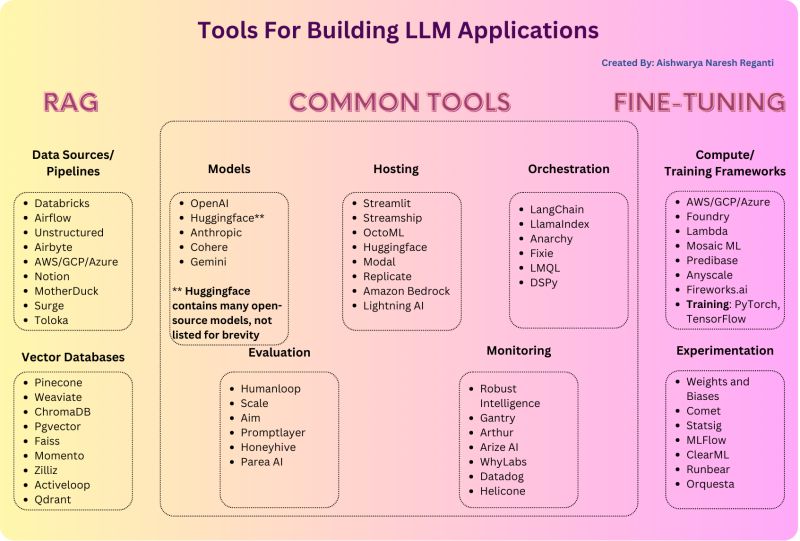
The LLM application landscape is rich with diverse tools and technologies, each serving different needs and stages of development. Finding the right tools is crucial for building successful applications.
📖 Comprehensive Guide: https://github.com/aishwaryanr/awesome-generative-ai-guide/blob/main/free_courses/Applied_LLMs_Mastery_2024/week5_tools_for_LLM_apps.md
Tool Categories Overview
graph TB
    A[LLM Application Tools] --> B[Input Processing]
    A --> C[LLM Development]
    A --> D[Output Tools]
    A --> E[Application Tools]

    B --> B1[Data Pipelines]
    B --> B2[Vector Databases]

    C --> C1[LLM Providers]
    C --> C2[Orchestration]
    C --> C3[Fine-tuning]

    D --> D1[Evaluation]
    D --> D2[Post-processing]

    E --> E1[Hosting]
    E --> E2[Monitoring]

    style A fill:#e1f5ff
    style B fill:#fff3cd
    style C fill:#d4edda
    style D fill:#f8d7da
    style E fill:#e7d4f8
Four Main Tool Categories
| Category | Purpose | Key Tools | Use Case |
|---|---|---|---|
| Input Processing | Data ingestion & preparation | Pipelines, Vector DBs | RAG, Data prep |
| LLM Development | Model interaction & training | Providers, Orchestration | Development, Training |
| Output Tools | Post-processing & evaluation | Evaluation frameworks | Quality assessment |
| Application Tools | Hosting & monitoring | Deployment, Monitoring | Production |
1. Input Processing Tools
Retrieve: Handle data ingestion and prepare inputs for LLM applications.
Purpose: Process and prepare data for LLM consumption
Components:
- Data Pipelines: ETL, data transformation
- Vector Databases: Embedding storage and retrieval
- Data Preprocessing: Cleaning, formatting
Tools:
- Vector DBs: Pinecone, Weaviate, Chroma, Qdrant
- Data Pipelines: Apache Airflow, Prefect
- ETL Tools: dbt, Apache Spark
Use Cases:
- RAG applications
- Data preparation
- Embedding storage
- Document processing
Architecture:
graph LR
    A[Raw Data] --> B[Data Pipeline]
    B --> C[Processing]
    C --> D[Vector DB]
    D --> E[LLM Application]

    style A fill:#e1f5ff
    style B fill:#fff3cd
    style D fill:#d4edda
    style E fill:#f8d7da
2. LLM Development Tools
Innovate: Tools for interacting with, fine-tuning, and orchestrating LLMs.
Purpose: Develop and interact with Large Language Models
Subcategories:
| Subcategory | Tools | Purpose |
|---|---|---|
| LLM Providers | OpenAI, Anthropic, Cohere | Model access |
| Orchestration | LangChain, LlamaIndex | Workflow management |
| Fine-tuning | Hugging Face, LLaMA-Factory | Model customization |
| Experimentation | Weights & Biases, MLflow | Experiment tracking |
LLM Providers:
- OpenAI: GPT-4, GPT-3.5
- Anthropic: Claude
- Cohere: Command models
- Open Source: Hugging Face, Ollama
Orchestration Platforms:
- LangChain: General-purpose framework
- LlamaIndex: RAG-focused
- Haystack: End-to-end NLP
- Semantic Kernel: Microsoft’s framework
Fine-tuning Tools:
- Hugging Face: Transformers library
- LLaMA-Factory: Easy fine-tuning
- Unsloth: Fast fine-tuning
- Axolotl: Efficient training
3. Output Tools
Retrieve: Post-processing and evaluation tools for LLM outputs.
Purpose: Manage and refine LLM application outputs
Tools:
- Evaluation Frameworks: TruEra, RAGas, LangSmith
- Output Processing: Post-processing pipelines
- Quality Assessment: Metrics and scoring
Evaluation Metrics:
- Accuracy
- Relevance
- Coherence
- Factual correctness
- User satisfaction
Example:
1
2
3
4
5
6
7
8
9
10
11
12
13
# Evaluation example
from ragas import evaluate
from datasets import Dataset

# Evaluate RAG system
results = evaluate(
    dataset=dataset,
    metrics=[
        "faithfulness",
        "answer_relevancy",
        "context_precision"
    ]
)
4. Application Tools
Retrieve: Tools for hosting, monitoring, and managing LLM applications.
Purpose: Production deployment and operations
Components:
- Hosting: Cloud platforms, containers
- Monitoring: Performance, errors, usage
- Scaling: Auto-scaling, load balancing
Tools:
- Hosting: AWS, GCP, Azure, Vercel
- Monitoring: LangSmith, Weights & Biases
- APIs: FastAPI, Flask
- Containers: Docker, Kubernetes
RAG vs. Fine-Tuning Tools
Innovate: Different tools are needed for RAG versus fine-tuning approaches.
| Approach | Key Tools | Focus |
|---|---|---|
| RAG | Vector DBs, Retrievers, Embeddings | Data retrieval |
| Fine-Tuning | Training frameworks, Datasets, GPUs | Model training |
RAG Tools:
- Vector databases
- Embedding models
- Retrieval frameworks
- Chunking tools
Fine-Tuning Tools:
- Training frameworks
- Dataset preparation
- GPU resources
- Experiment tracking
Tool Selection Guide
graph TD
    A[LLM Application Need] --> B{Approach?}
    B -->|RAG| C[RAG Tools]
    B -->|Fine-Tuning| D[Fine-Tuning Tools]
    B -->|Both| E[Hybrid Tools]

    C --> C1[Vector DB]
    C --> C2[Retrieval]
    C --> C3[Embeddings]

    D --> D1[Training Framework]
    D --> D2[Datasets]
    D --> D3[GPUs]

    style A fill:#e1f5ff
    style C fill:#fff3cd
    style D fill:#d4edda
Key Takeaways
Retrieve: LLM application tools fall into four categories: input processing, LLM development, output tools, and application tools, each serving different stages of development.
Innovate: By understanding tool categories and their purposes, you can select the right tools for RAG, fine-tuning, or hybrid approaches, building efficient LLM applications.
Curiosity → Retrieve → Innovation: Start with curiosity about LLM tools, retrieve insights from comprehensive guides, and innovate by selecting and combining tools for your specific use cases.
Note: This guide provides an overview of popular tools. For comprehensive coverage, explore the full guide linked above.
Next Steps:
- Review the comprehensive guide
- Identify tools for your use case
- Experiment with different tools
- Build your LLM application stack
Translate to Korean
🥁 LLM 어플리케이션 구축을 위한 가장 인기 있는 툴과 프레임워크에 대한 포괄적인 가이드를 확인해 보세요.
👉 LLM 어플리케이션 구축을 위한 환경은 다양한 툴과 기술로 풍부하며, 각 툴과 기술은 서로 다른 요구와 프로세스 단계를 충족시킵니다.
👉LLM 앱에 적합한 툴과 프레임워크를 찾고 선택하는 것이 핵심이며 시간이 걸립니다. 이제 막 시작하더라도 무엇이 있고 모든 것이 어떻게 함께 작동하는지 아는 것이 매우 중요합니다!
⛳ 의사 결정 과정을 단순화하기 위해, LLM 애플리케이션 개발에 사용할 수 있는 방대한 옵션 풀을 탐색하는 데 도움이 되는 자세한 가이드를 작성했습니다.
🔰 LLM 툴은 크게 네 가지 범주로 분류할 수 있습니다.
⛳ 입력 처리 도구: 이러한 도구는 데이터 수집을 처리하고 애플리케이션에 대한 다양한 입력을 준비하도록 설계되었습니다. 여기에는 LLM을 위한 데이터를 처리하고 준비하는 데 중요한 데이터 파이프라인과 벡터 데이터베이스가 포함됩니다.
⛳ LLM 개발 툴(LLM Development Tools): 이 카테고리에는 다음을 지원하는 툴이 포함됩니다. 대규모 언어 모델과 상호 작용합니다. 여기에는 LLM 호출, 미세 조정, 실험 수행, 오케스트레이션 관리를 위한 서비스가 포함됩니다. 예를 들어 LLM 공급자, 오케스트레이션 플랫폼, 컴퓨팅 및 실험 플랫폼이 있습니다.
⛳ 출력 툴(Output Tools): LLM 어플리케이션의 출력을 관리하고 다듬는 포스트 프로세싱 툴이 이 범주에 속합니다. LLM이 결과물을 생성한 후의 프로세스(예: 결과물의 품질과 관련성을 평가하는 평가 프레임워크)에 초점을 맞춥니다.
⛳ Application Tools: LLM 어플리케이션의 모든 측면을 관리하는 툴로, 호스팅, 모니터링 등을 포함합니다.
🎯 이 가이드에서는 이러한 유형의 도구, 다양한 옵션, 장점 및 단점에 대한 심층적인 통찰력을 제공하여 애플리케이션 빌드에 사용할 수 있는 항목과 이러한 리소스를 가장 잘 활용하는 방법에 대한 포괄적인 보기를 제공합니다.
🛑 이 가이드는 결코 포괄적이지 않으며 인기 있는 도구에 대한 개요만 제공하기 위한 것입니다!
이러한 툴을 분류하는 것 외에도 RAG에 필요한 툴과 LLM을 미세 조정하는 데 필요한 툴을 구분했습니다.