AI
Browser Use 1.0: Cloud Defaults, MCP Pipelines, and Process Lifecycle
A source audit of Browser Use 1.0.3 commit dfb6a73d examining default cloud boundaries, CLI MCP BrokenPipe handling, background daemons, and cancellation billing budgets.
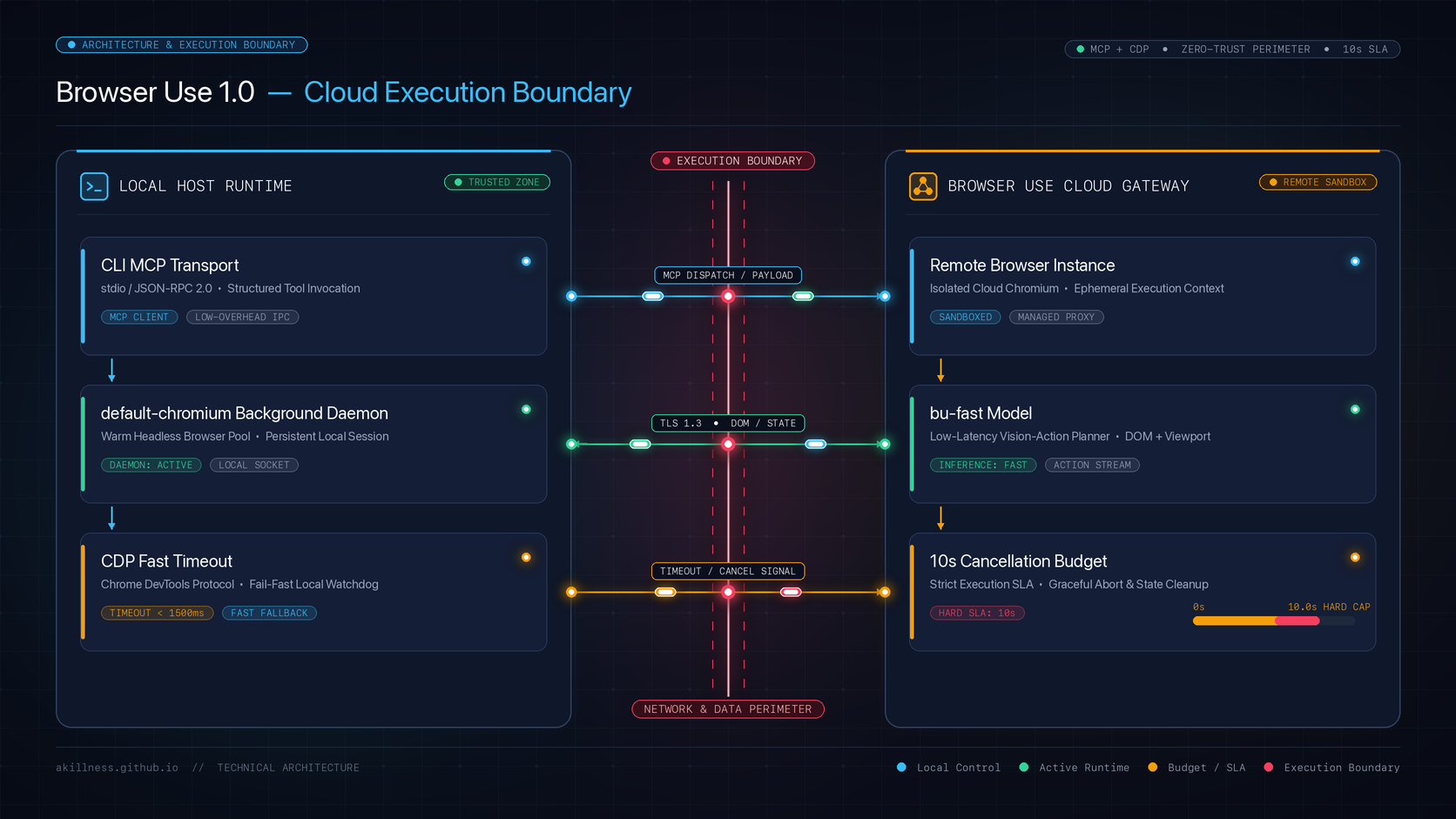
Where Does Browser Use 1.0 Actually Execute Your Agent Tasks?
When developers upgrade an AI browser agent harness from version 0.x to 1.0, they frequently assume the underlying execution mechanics remain identical: an automated browser launched on localhost, controlled via Playwright or Chrome DevTools Protocol (CDP), and driven by an agentic decision loop. In Browser Use 1.0, however, that architectural default fundamentally changed.
The minimal Agent(...).run_sync() constructor in Browser Use 1.0 routes tasks through the Browser Use Cloud gateway by default, moving browser hosting and runner infrastructure outside the developer machine. Rather than initiating a local subprocess, the out-of-the-box Python snippet assumes the presence of a cloud API key and provisions compute in a managed environment.
Even when an engineer overrides this configuration, nuanced boundaries remain. Specifying Browser('chromium') provisions a local browser process on the host, but page screenshots and accessibility trees are still dispatched to external model provider APIs. Understanding where browser automation state lives—and where remote telemetry and network traffic flow—is essential for building reliable, secure agent infrastructure.
%%{init: {"flowchart": {"useMaxWidth": false}}}%%
flowchart LR
    subgraph Client ["Developer Host Environment"]
        AgentCode["Agent Script / CLI"]
        LocalBrowser["Local Chromium Daemon (default-chromium)"]
    end

    subgraph CloudBoundary ["External Boundaries"]
        CloudGateway["Browser Use Cloud Gateway"]
        LLMProvider["Model Provider API (OpenAI / Anthropic)"]
    end

    AgentCode -->|Default run_sync| CloudGateway
    AgentCode -.->|Explicit Browser config| LocalBrowser
    LocalBrowser -->|DOM and Screenshots| LLMProvider

    style Client fill:#f8fafc,stroke:#38bdf8,stroke-width:2px,color:#111827
    style CloudBoundary fill:#fffbeb,stroke:#f59e0b,stroke-width:2px,color:#111827
The release of Browser Use commit dfb6a73d520809341c975c6a01c228327991e88b (tagged for version 1.0.3) provides detailed telemetry-derived error data from real-world deployments. By analyzing the fixes merged in this update, systems engineers can trace how headless environments, Model Context Protocol (MCP) clients, and process teardowns behave under stress.
The CLI MCP Pipeline and BrokenPipe Error Traps
Integrating browser automation into broader desktop agent frameworks often relies on standard input/output transport pipelines. Browser Use provides a dedicated --cli-mcp mode designed to expose browser control tools to MCP hosts and agent orchestrators. However, production telemetry revealed a common failure pattern: when an MCP host disconnected or closed its communication pipe immediately after issuing a termination command, the CLI process crashed with a non-zero exit code.
Specifically, across hundreds of logged devices, exiting processes raised unhandled ExceptionGroup(BrokenPipeError). While the primary automation task had concluded successfully, the premature closure of standard output caused the process to register as an unhandled application error.
In --cli-mcp mode, early client pipe closure previously triggered an unhandled BrokenPipeError exception group on exit; 1.0.3 intercepts client-gone errors with except* OSError to guarantee a clean zero exit status. This pattern highlights a critical lesson for MCP server implementers: stdio communication must account for asymmetric client shutdown sequences without treating downstream pipe termination as an execution failure.
Process Isolation: Background Daemons and Cross-Namespace DevTools Ports
Running browser agents in continuous integration pipelines, headless Linux servers, or embedded editor sandboxes introduces difficult browser lifecycle constraints. Previous iterations frequently failed when attempting to spawn visible browser windows in headless environments where no display server was present.
The CLI script mode now runs an isolated background daemon named default-chromium to ensure headless environments and script invocations consistently obtain a browser instance without colliding with interactive sessions. By decoupling the automation browser from the desktop user’s daily browser sessions, the harness eliminates conflicts over user profiles, active cookies, and window focus. The daemon process persists across subsequent script calls to avoid cold-start launch penalties, but can be cleanly terminated by passing the --reload parameter.
Containerized development environments—such as Docker containers, devcontainers, or IDE workspaces like Cursor—introduce an additional layer of complexity: process namespace isolation. When Chrome runs in a separate PID namespace, standard port-discovery mechanisms often reject active debugging handles due to mismatched process IDs.
Browser Use 1.0.3 resolves DevToolsActivePort across separate process namespace boundaries when the active process shares the matching browser identifier, fixing attachment in containerized workflows. By validating the unique browser identifier rather than requiring identical host PID numbers, the framework allows sandboxed agent orchestrators to control containerized browser targets securely.
Fail-Fast CDP Timeouts and Bounded Cancellation Budgets
Network timeouts and cancellation semantics are often overlooked until deployed systems encounter hung connections or mounting cloud infrastructure costs. In earlier releases, configuring an incorrect or unreachable remote CDP endpoint via BU_CDP_URL caused client processes to stall for up to 30 seconds before delivering a vague error message.
Refused connections to BU_CDP_URL now terminate after a 3-second timeout rather than blocking the caller in a 30-second hang. Failing fast when a debugging endpoint is unavailable prevents agent orchestrators from accumulating blocked workers in concurrency queues.
A far more significant financial risk involved task cancellation during cloud browser execution. When an operator or automated watchdog cancelled a running task via task.cancel() or keyboard interrupt, the shutdown routine initiated a synchronization pass to preserve downloaded files from the remote browser environment. Each file listing and copy operation could take up to 300 seconds, maintaining cloud session allocation and generating billable charges long after the task was ostensibly stopped.
Task cancellation bounds post-cancellation cloud download synchronization to a shared 10-second budget via CANCEL_DOWNLOADS_TIMEOUT_S, preventing cancelled runs from sustaining cloud billing for up to 300 seconds. If download copying cannot complete within that strict 10-second ceiling, the operation terminates cleanly. In persistent keep_alive configurations, incomplete transfers are deferred to the workspace of the subsequent run, balancing data recovery against runaway infrastructure expenses.
| Architectural Dimension | Version 0.x Behavior | Version 1.0.3 Behavior | Operational Impact |
|---|---|---|---|
| Default Execution Host | Local Playwright Chromium | Browser Use Cloud Gateway | Requires explicit Browser() config for local runs |
| MCP Pipe Teardown | BrokenPipeError crashes (exit 1) | Intercepted via except* OSError (exit 0) | Clean pipeline exits in host orchestrators |
| Daemon Lifecycle | Ephemeral per-invocation process | Persistent default-chromium daemon | Eliminates cold-start browser startup overhead |
| Cross-Namespace CDP | Rejected on PID mismatch | Validated by browser identifier match | Container and devcontainer compatibility |
| CDP Refusal Timeout | 30-second blocking wait | 3-second fail-fast termination | Rapid diagnostic feedback on connection failure |
| Cancel Teardown Budget | Up to 300 seconds per copy pass | 10-second CANCEL_DOWNLOADS_TIMEOUT_S cap | Prevents cloud billing leakage on abort |
Pruning Legacy 0.x Metadata from Tool-Result Payloads
As agent frameworks evolve, legacy configuration parameters can subtly degrade language model decision performance. During the transition from Browser Use 0.x to 1.0, internal action structures retired several fine-grained control flags, including include_in_memory and include_extracted_content_only_once.
In early 1.0 builds, while the first deprecated field was filtered out, secondary legacy fields occasionally survived serialization and leaked directly into the tool-result JSON payloads returned to the LLM. This unintended leakage introduced noise into the model’s context window, risking hallucinations or format confusion in structured outputs.
The updated ActionResult implementation strips legacy 0.x memory and extraction flags with explicit warnings, preventing deprecated internal fields from reaching model tool-result payloads. Keeping the schema boundary between harness execution metadata and model context clean is vital for maintaining deterministic agent behavior.
Systems engineers interested in how browser agent decision latency and decision-loop boundaries are benchmarked in production can review our earlier analysis of Jev browser agent decision loops. Furthermore, understanding how transport layers impact protocol boundaries is explored in our evaluation of MCP security and transport construction.
Key Takeaways
- Default cloud boundaries: The default
Agent(...).run_sync()constructor delegates compute to Browser Use Cloud; running locally requires explicitBrowser('chromium')instantiation. - Local browser vs. local inference: A local Chromium process does not imply local data custody; DOM structures and screenshots are still transmitted to the configured LLM API.
- Resilient stdio teardown: Handling
BrokenPipeErrorwithexcept* OSErrorensures that CLI MCP tools exit with status 0 when clients close communication pipes early. - Fail-fast operational contracts: Reducing refused CDP timeouts to 3 seconds and capping cancellation download passes at 10 seconds prevents pipeline hangs and runaway cloud billing.
- Clean context hygiene: Sanitizing deprecated internal metadata from
ActionResultpayloads protects downstream language models from schema pollution.
New Questions
- How should browser agent harnesses detect and prevent DOM-based prompt injection attacks before page context reaches the reasoning model?
- Under what conditions should multi-tenant container environments isolate CDP sockets with mutual TLS rather than relying solely on process namespace and filesystem permissions?
- Can client-side browser agents dynamically throttle visual screenshot capture frequency based on DOM mutation density to minimize LLM token overhead?
References
Editorial method: claims in this article point to primary documentation, pinned source code, runnable checks, or dated measurements, with AI-assisted research under the site's evidence-gated policy. How this site verifies claims and discloses AI assistance · Report a correction.
Working on something like this?
I take a small number of paid, scoped reviews: AI agent/RAG architecture diagnosis, Unity CI & build-automation audits, and multimodal QA design review. Each one ends in a written findings document.
Work with me