AI
Switch's Telemetry Toggle Has Three Timing Boundaries
A pinned source audit separates per-event Console telemetry from restart-time server settings and a 14-day shared-host guard.
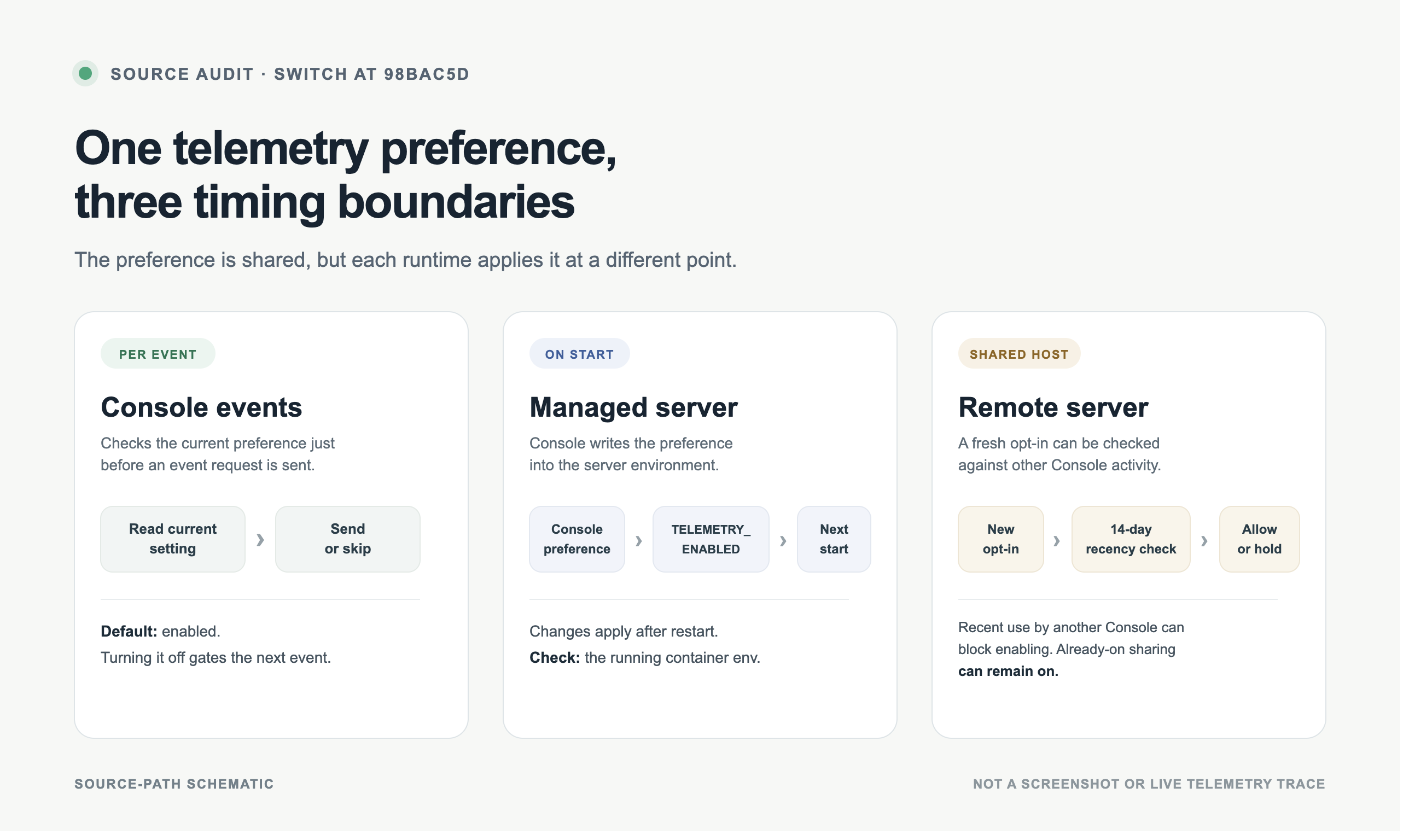
Switch’s telemetry control is not one uniform switch across runtimes. At the inspected commit, the Console’s enabled value gates Console-originated events immediately. A Console-managed server receives TELEMETRY_ENABLED in its environment at startup and applies a changed value on a later restart. A shared remote host adds a separate check before a new opt-in. Those are three different timing boundaries.
This is a source audit of Switch at commit 98bac5d, not a report about a live installation. No Switch instance or telemetry endpoint was queried. The key question is not whether the settings screen has a toggle, but which process reads it and when.
Does Switch use one telemetry gate?
Not exactly. The Console and the standalone Switch Core server have different defaults, and a managed server sits between them.
The Console settings registry initializes telemetry.enabled as true. The askedAt field records when the first-run notice was shown; it is not the send gate. The consent helper reads the current enabled setting, and the telemetry service checks that helper before each event request. The service test changes the setting between two events and expects only the earlier, allowed event to reach the mocked sender. In other words, turning the Console setting off can gate the next Console event. It does not retract a request already sent.
That default is opt-out behavior, not a requirement to wait for the first-run notice before any event is eligible. The preference still matters: the code reads it at the point of transmission rather than treating askedAt as proof of consent. That distinction is easy to miss if a reader sees the label “consent” and assumes the prompt timestamp itself controls sending.
A standalone Core server starts from a different default
The separate Switch Core configuration declares telemetry_enabled as false. Its telemetry setup selects a no-op sink when the value is false, and the project README describes standalone Core telemetry as opt-in. With the standalone default, a Core process does not begin reporting merely because the Console has an enabled-by-default preference.
This is the first important boundary: the Console’s default is enabled, while standalone Core’s default is disabled. A statement such as “Switch telemetry is on by default” is incomplete unless it names which component and which configuration path it means.
A Console-managed server is different again. Its preference is supplied by the Console rather than inherited from the standalone default. The Core default therefore should not be used to infer the state of a server started and managed through Switch Console.
A managed server applies a changed setting at startup
The managed-server consent helper reads the same Console telemetry preference and passes the result into the server setup path. When Console writes the server environment file, it records an explicit TELEMETRY_ENABLED=true or TELEMETRY_ENABLED=false. The README says the server reads that setting when it starts, so a change takes effect after a restart.
That creates three values an operator should not collapse into one:
| Value | What it represents | What it does not prove |
|---|---|---|
| Console preference | The desired setting in the desktop app | That a running container has restarted |
Generated .env value | The value written for a start request | That the current process has adopted it |
| Running container environment | The setting reported by the active container | What another host or standalone process is doing |
Switch’s readDeployedTelemetry() status path checks the running container environment first and uses the .env value as a fallback. That makes the container environment the most direct source-defined check for a managed process. If the setting was changed but the server has not restarted, the saved Console preference and the running process may describe different moments.
This audit did not inspect the actual settings screen or query a deployment. It therefore does not claim that a particular user currently has telemetry enabled or disabled. It only identifies what the pinned code says should be read when answering that question.
A shared remote host adds a 14-day guard
A remote server used by more than one Console has another decision at startup. A “No” from the current Console keeps telemetry off for that request. A fresh “Yes” is not always enough to enable sharing: the startup path checks whether another Console has been seen recently. The shared-server policy sets that window to 14 days and excludes the current Console from the “other Console” check.
There is an important exception. If the shared stack is already reporting telemetry, the code can preserve that state rather than turning it off just because another Console is now present. If the shared registration data cannot be read, the new decision fails closed. The tests cover the recent-other-Console block, the no-recent-other-Console path, the already-enabled path, and an unreadable registration result.
So the 14-day rule is not a global timer that automatically shuts down every shared stack. It is part of the decision about enabling a shared remote server. The boundary is the new startup decision, not a claim that all existing installations are continuously re-evaluated.
What should an operator check before calling telemetry off?
Start by naming the process. For a Console event, inspect the Console preference: the next event checks it. For a standalone Core process, inspect its own TELEMETRY_ENABLED configuration; its default is off. For a Console-managed server, check whether the server restarted after the preference changed and prefer the running container environment when available. For a shared remote host, also ask whether another Console was recently active and whether this is a new opt-in or an already-reporting stack.
| Situation | Source-defined timing | Useful check |
|---|---|---|
| Console sends an event | Preference is checked before each request | Read the Console’s current setting |
| Managed server changes setting | New value is applied at startup | Read the running container environment; confirm restart state |
| Shared remote server is newly enabled | Registration check runs at startup | Check the 14-day other-Console guard and whether the registration read succeeded |
The practical rule is modest: report a preference as a preference, and report a running process as a running process. A saved value is not a substitute for checking which environment the active container actually received.
Key Takeaways
- The Console default is enabled and its send path reads the current preference before each event.
- Standalone Switch Core starts with telemetry disabled unless explicitly enabled.
- A Console-managed server receives the Console preference through
TELEMETRY_ENABLEDat start; a later change takes effect after restart. - Shared remote startup can block a fresh opt-in based on another Console’s activity in the last 14 days, while an already-enabled shared stack may remain enabled.
- These findings describe a pinned source revision and its tests. They do not establish the state of a live server.
For a field-level example of checking a privacy promise against the event registry, compare the Orca telemetry audit. For an adjacent agent-control boundary, see the Cloudflare OS approval audit.
New Questions
- Should the Console show the effective state of each managed server beside the saved preference, including whether that server restarted after a change?
- Is a 14-day recent-use window the right boundary for teams whose members or Console installations change frequently?
- How should the UI describe the distinction between the Console’s default-on preference and standalone Core’s default-off configuration without implying a single global setting?
References
- Switch repository at commit 98bac5d
- Switch README at the pinned commit
- Switch telemetry documentation
- Console telemetry service
- Console consent reader
- Console telemetry settings registry
- Managed-server telemetry consent and deployed status
- Managed-server environment writer
- Shared-host start pipeline
- Shared-server 14-day policy and tests
- Switch Core configuration
- Repository license
Editorial method: claims in this article point to primary documentation, pinned source code, runnable checks, or dated measurements, with AI-assisted research under the site's evidence-gated policy. How this site verifies claims and discloses AI assistance · Report a correction.
Working on something like this?
I take a small number of paid, scoped reviews: AI agent/RAG architecture diagnosis, Unity CI & build-automation audits, and multimodal QA design review. Each one ends in a written findings document.
Work with me