AI
Claude Code rewind depends on who changed the file
A source-based Claude Code /rewind recovery matrix covering tool provenance, execution context, turn boundaries, path safety, and surviving snapshots.
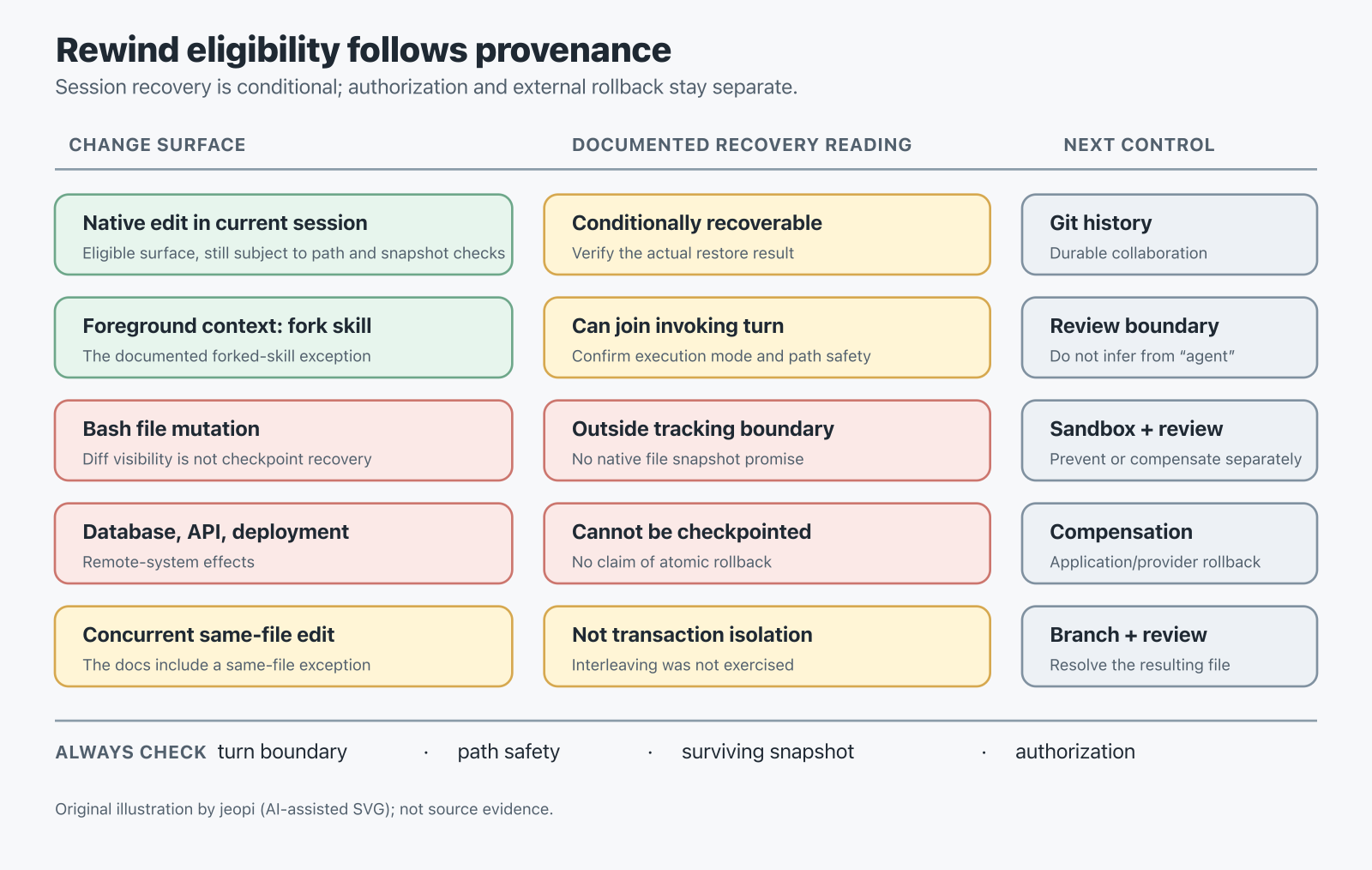
Claude Code’s agentic loop is usually described as three moves: gather context, take action, and verify results. That description is useful, but it leaves out the question that matters when an agent is allowed to touch a real repository: what, exactly, can be undone when the action is wrong?
This Source Audit answers that question from the current agent-loop documentation, the checkpointing reference, and the related official references read on 2026-10-15. It is a documentation-based operational synthesis, not a reproduced reliability result. No Claude Code process, interactive /rewind operation, SDK rewind call, retention sweep, or concurrent-writer scenario was run for this article.
Which Claude Code changes can /rewind actually restore?
The answer is narrower than a transaction model. The CLI’s /rewind can restore eligible session file edits and, optionally, conversation state. It cannot turn every visible change into an atomic rollback. Recoverability depends on the editing tool, the executor that made the edit, the turn boundary, path safety, and whether the snapshot files still exist. Authorization, shell containment, durable history, and compensation for an external side effect are separate responsibilities.
Open the original SVG diagram.
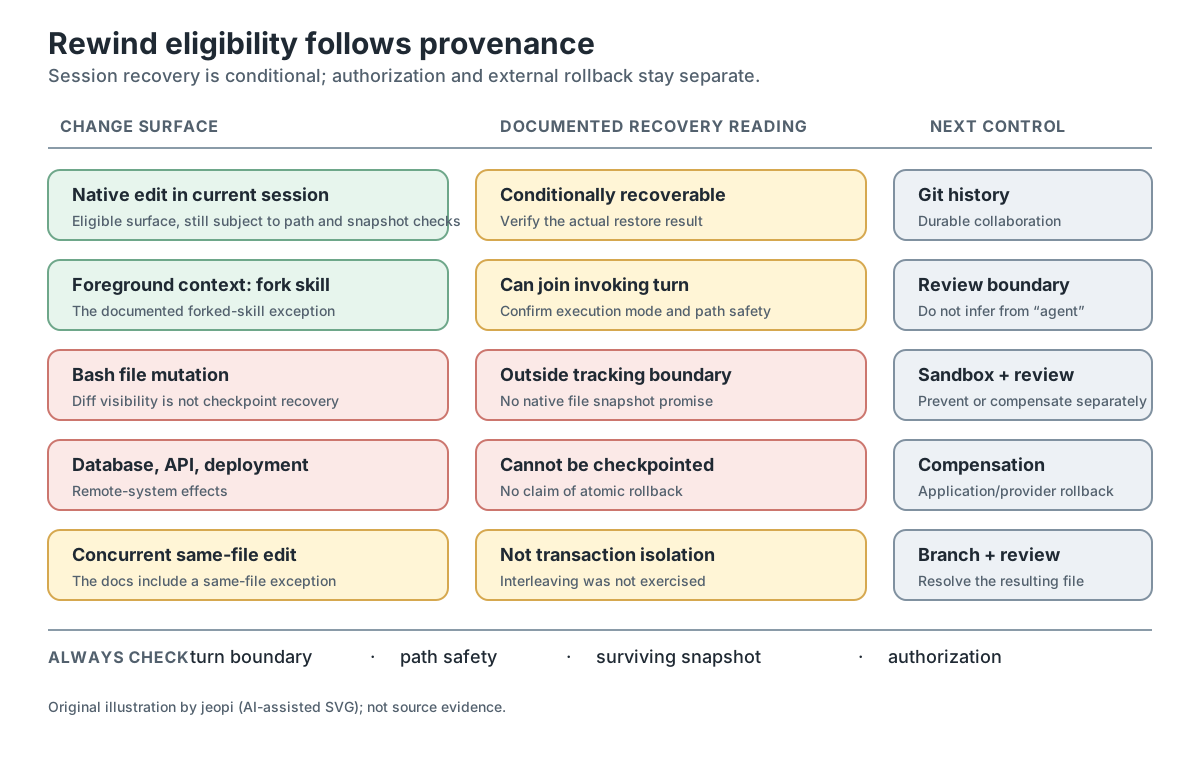
A checkpoint starts at the turn boundary
The checkpointing documentation says that every prompt that starts a turn creates a checkpoint. That is not the same as taking a snapshot before every message that appears while Claude is already working.
This distinction matters for a long-running task. A message sent mid-turn can change the conversation, but it does not create an independent code restore point. The documentation says that edits made after that message still count toward the prompt that started the turn. In the rewind menu, that produces separate choices: restore both code and conversation, restore only the conversation while keeping current code, or restore code while keeping the conversation.
Those choices are not cosmetic. Restoring the conversation is not evidence that a file, database, deployment, or API call went back. Restoring code is not a promise that every event in the conversation can be replayed safely. The practical rule is to label the turn-start checkpoint as the restore boundary, then treat mid-turn messages as context changes inside that boundary. The agent-loop guide describes the gather, act, verify phases; the checkpointing reference defines the narrower restore surface.
The editing tool is only the first question
A file changed by Claude’s native editing tool is not automatically equivalent to a file changed by a shell command. The checkpointing reference states directly that files modified by Bash commands are not tracked by checkpointing. A shell command can still leave a diff that Claude can inspect, but diff visibility and checkpoint recovery are different contracts.
The hooks reference describes a separate observability path: a PostToolUse hook can receive changed files in tool_response.bashEditDiff after a Bash call. The same passage says to use that list to find what to review, not to enforce a policy. This is an inferred distinction between observability and recovery, not a reproduced diff capture. The documented reporting support requires Claude Code v2.1.269 or later, is best effort, may include another process’s changes, and excludes some files. It does not make Bash mutations checkpoint-reversible.
The same distinction appears in subagent execution. The skills documentation makes execution mode conditional: a forked skill normally runs in the background, while background: false waits in the invoking turn; the page also lists other foreground exceptions. The checkpointing reference names one specific exception: a skill using context: fork that runs in the foreground edits the working tree during the invoking turn, so its edits can be restored in the usual way. Edits from any other subagent are not restored by rewind. The variable is not merely “was an agent involved?” It is which execution path produced the edit and which session owns the checkpoint.
That gives a useful contrast:
| Change provenance | What the docs establish | What to add around it |
|---|---|---|
| Native file edit in the current session | It is within the documented file-edit checkpoint surface, subject to path and snapshot limits. | Keep a durable version-control checkpoint for history. |
Foreground context: fork skill edit | The documented forked-skill exception can make the edit restorable in the invoking turn. | Confirm the actual execution mode instead of inferring it from the word “foreground.” |
| Background or other subagent edit | Rewind does not restore it under the documented rule. | Give the subagent its own review and recovery boundary. |
| Bash file mutation | Bash-modified files are outside checkpoint tracking. | Use shell containment, explicit review, and a separate rollback procedure. |
| Database, API, or deployment action | Remote-system effects cannot be checkpointed. | Use an application-specific compensating action or provider rollback. |
The table is a decision aid inferred from the cited documentation, not a vendor guarantee. It does not claim that a native edit is always recoverable or that a subagent edit is never visible. It says that the checkpoint contract follows provenance and execution context.
A listed checkpoint can still lack a usable snapshot
The Claude Code directory reference describes snapshots for the 100 most recent checkpoints and a cleanup sweep whose default is about 30 days after the session last saved a snapshot. That is approximately 30 days, not a guaranteed deletion deadline: the timing is configurable and the reference documents retention exceptions.
The error reference adds a more uncomfortable case. After a session is resumed, /rewind can still list checkpoints even when the files needed to restore one have disappeared. In that state, the menu is evidence that a conversation checkpoint entry exists, not evidence that the corresponding code restore will succeed.
Path safety can also turn a broad restore into a partial one. The error reference documents skipped paths when a path is or became a symlink, hard link, or other non-regular file, when its directory changed since the checkpoint, or when its backup cannot be safely read. A skipped path keeps its current contents. The link-safe skipping behavior is documented at Claude Code v2.1.216 and later; older behavior must not be described as equivalent. Code restoration is therefore not all-or-nothing, and an engineer should read the restore result rather than infer success from the existence of a rewind entry.
At commit 94506ff0d3bd9185f1752da36e968775021fb48f, the official changelog records this correction under v2.1.260: /rewind and --rewind-files no longer report success when checkpoint backup files are missing and nothing was actually restored. That is release-note evidence, not a defect reproduced in this run, and it does not establish universal correctness across versions.
Same-file concurrency is not transaction isolation
The checkpointing documentation says that edits from other concurrent sessions are normally not captured unless they happen to modify the same files as the current session. That same-file exception is easy to misread. It does not establish transaction isolation, and it does not promise that restoring one session will preserve another writer’s interleaved changes.
The safe interpretation is deliberately modest: concurrent work is outside the normal capture path, with an explicit same-file caveat. If two agents or a human and an agent touch one file, /rewind should not be treated as a merge engine. Use small commits, isolated branches or worktrees where appropriate, and an explicit review of the resulting file. Those are engineering recommendations inferred from the documented limitation, not claims about an untested interleaving outcome.
Permission and recovery solve different problems
Permission rules answer whether Claude Code may attempt a tool call. They do not answer whether an already-completed action can be reversed. The permissions reference says that rules are enforced by Claude Code rather than by the model and evaluated in deny, ask, allow order. Its approval table is specifically scoped to Manual mode; other modes and explicit rules change prompt behavior.
The same permissions reference warns that a command-text Bash deny rule is not an OS boundary around every equivalent invocation of a program. Alternate invocations and the active permission mode still matter. That is a reason to treat command rules as authorization policy, not as durable containment.
Hooks occupy another boundary. A PreToolUse hook runs before a tool call is processed and can deny that pending call; see the hooks reference. If a handler fails, the default is not automatically fail-closed. For command or HTTP hooks, onFailure: "block" requires Claude Code v2.1.295 or later, while the documentation retains event/type exceptions, including background command hooks and the Stop, SubagentStop, TaskCompleted, and TeammateIdle cases. A hook can prevent an action that has not happened yet. It cannot rewind a remote write that already happened.
The built-in Bash sandbox is different again. It covers shell commands only; file tools, MCP servers, and hooks run outside it. Sandboxing is preventive containment, not a restore mechanism.
The resulting control map is:
- Authorization: permissions decide which tool calls may run under the active mode and rules.
- Pre-execution policy: hooks can inspect or deny a pending call, with explicit failure behavior if fail-closed handling is required.
- Shell containment: sandboxing limits the shell surface, not file tools, MCP servers, or hooks.
- Durable file history: Git provides collaboration and permanent history beyond session retention.
- External compensation: databases, APIs, and deployments need application- or provider-specific rollback actions.
- Session recovery:
/rewindrestores only the subset of file and conversation state that meets its documented conditions.
That separation is this article’s original decision framework. It is an inference from the combined docs, not an assertion that these mechanisms compose into one transaction.
The SDK narrows the promise further
The official Agent SDK file-checkpointing reference is explicit: file-only rewind restores files on disk to a previous state; it does not rewind the conversation itself. The pinned Python wrapper at query.py commit c10b52c674e5c709c7263544b38e8a5dad10e01d forwards Query.rewind_files as a rewind_files control request, with the public client delegating to that query method. This is a source audit of the wrapper’s forwarding and activation path only; it is not a source audit of the proprietary restore engine, and no SDK method was executed.
A recovery-eligibility test for delegated work
Before delegating a change, ask these questions in order:
- Which surface will write? Native file edit, Bash, a skill, a subagent, an MCP server, or a remote API are different provenance classes.
- Which executor owns the checkpoint? A foreground
context: forkskill has a documented exception; other subagent paths do not inherit that guarantee. - When is the restore point created? A prompt that starts a turn creates the checkpoint. A mid-turn message does not create a new code restore point.
- Can the path still be restored? Check for links, changed directories, unreadable backups, and partial-restore messages.
- Do the snapshots still survive? A listed checkpoint can outlive the backup files needed to restore it.
- Is the effect external? If it changes a database, API, deployment, or other remote system, plan compensation before execution.
- What prevents the call if it is not acceptable? Choose permissions, a hook, shell containment, or a provider policy for prevention. Do not call that choice rollback.
If the answer to the first five questions is uncertain, treat the action as non-rewindable for planning purposes. That is a conservative engineering inference, not a claim that the product will always fail to restore it.
The same caution applies to sessions. The sessions documentation distinguishes an in-process /branch from a separate-process --fork-session: session grants can carry over in one path and require re-approval in the other. Resume behavior also depends on how a session is resumed. Conversation continuity is therefore not identical to authority continuity, and a conversation branch is not a Git branch, a worktree, or a filesystem clone.
For a companion example of preventive control rather than recovery, read the CodeBurn hard-cap audit. For the broader harness perspective, continue to Harness Engineering: What a Benchmark Score Actually Measures, which separates model, tool, task, and environment contributions to reported results instead of claiming a universal production effect. Both are next actions, not substitutes for the checkpoint contract.
What changed since the March 2026 note
The March 31 note treated checkpoints as a broad safety primitive and discussed the agent loop, session forks, and repository-safety concerns at a higher level. This October 15 re-read changes the article’s claim boundary; it does not claim that every limitation below first appeared after March, because no historical documentation comparison was available.
- From “checkpoint” to restore boundary: the analysis now distinguishes a prompt that starts a turn from a message sent mid-turn, then separates code restoration from conversation restoration.
- From “agent edit” to provenance: native edits, a foreground
context: forkskill, other subagents, Bash mutations, and remote effects are separate classes. The same editing tool can have different checkpoint coverage depending on its executor. - From menu presence to usable backup: the survey now includes bounded retention, the approximately 30-day-after-last-snapshot default, resumed sessions whose backups are gone, path-skipping conditions, and the v2.1.260 changelog correction.
- From generic safety controls to distinct roles: permissions authorize, hooks can deny pending calls, sandboxing contains shell commands, Git preserves durable file history, and external systems need compensation. None is interchangeable with session recovery.
- From a single rewind story to surface-specific APIs: the public SDK page and pinned Python wrapper make file-only rewind and control-request forwarding explicit, without implying that the proprietary restore engine was inspected.
The only explicitly versioned product correction used here is the changelog entry under v2.1.260 at the pinned commit above. The v2.1.216 and v2.1.295 boundaries are included with their documented scopes and exceptions, not as claims about when the behavior was introduced.
What to promise a team
The useful promise is not “rewind makes agent work safe.” The useful promise is conditional: for an eligible session file edit with a surviving, readable snapshot, /rewind can provide fast session-level recovery; it can also restore conversation state separately. Everything else needs its own control surface.
That promise changes how a team writes task boundaries. Mark native file edits as candidates for session recovery, but still review the diff and keep durable history. Treat Bash mutations and non-foreground subagent edits as requiring explicit rollback planning. Treat remote actions as irreversible by default unless the application provides a tested compensating operation. Treat a green-looking rewind menu as a starting point for verification, not proof that every intended file returned to its prior state.
Claude Code’s loop remains gather, act, verify. The operational improvement is to make “verify” include recovery eligibility, not only the final diff. That is the boundary the original March note left implicit.
Key Takeaways
| Finding | Practical implication |
|---|---|
| Rewind is conditional session recovery, not a transaction. | Keep Git or another durable history mechanism for collaboration and permanent recovery. |
| Provenance and executor context decide the checkpoint surface. | Confirm whether the write came from native tools, a foreground forked skill, another subagent, Bash, or a remote system. |
| A listed checkpoint can outlive its usable backup. | Inspect restore results; do not treat a visible menu entry or a success message as proof that files returned. |
| Permissions, hooks, sandboxing, and compensation solve different problems. | Design prevention and rollback separately, with version and event-scope limits written down. |
| SDK file rewind is narrower than interactive conversation-and-code rewind. | Treat the public Python wrapper as a forwarding layer and verify the actual runtime contract independently. |
New Questions
- Which restore-result details should an automated harness require before it accepts a rewind as complete?
- How does same-file interleaving behave when two sessions write between checkpoints? The documentation preserves a same-file exception but does not specify an isolation guarantee, and this article did not run that scenario.
- Which retention configuration is active in a given deployment, and how should teams surface the age of the last surviving snapshot?
- Where should an SDK-based workflow record conversation state when file-only rewind is intentionally insufficient?
References
Claude Code documentation (read 2026-10-15)
- How Claude Code works — agentic loop, sessions, and remote effects.
- Checkpointing — turn boundaries, tracked tools, subagent and concurrent-session limits, and version-control scope.
- Claude Code directory — snapshot retention and cleanup behavior.
- Errors — missing backups and skipped paths.
- Permissions — rule precedence, Manual-mode approval scope, and Bash-rule limits.
- Hooks — PreToolUse decisions, Bash diff reporting, and
onFailurebehavior. - Sandboxing — shell-only containment and tools that run outside it.
- Skills — foreground and background forked-skill execution.
- Sessions —
/branch,--fork-session, and permission behavior on resume.
Release history (read 2026-10-15)
- Claude Code
CHANGELOG.mdat commit 94506ff0d3bd9185f1752da36e968775021fb48f — v2.1.260 correction for missing-backup success reporting.
Agent SDK documentation and source (read 2026-10-15)
- Agent SDK file checkpointing — file rewind does not rewind conversation state.
- Python SDK
query.pyat commit c10b52c674e5c709c7263544b38e8a5dad10e01d —rewind_filescontrol-request forwarding.
Related reading
- CodeBurn hard-cap audit — prevention through per-tool denial rather than recovery.
- Harness Engineering: What a Benchmark Score Actually Measures — model, tool, task, and environment attribution.
Editorial method: claims in this article point to primary documentation, pinned source code, runnable checks, or dated measurements, with AI-assisted research under the site's evidence-gated policy. How this site verifies claims and discloses AI assistance · Report a correction.
Working on something like this?
I take a small number of paid, scoped reviews: AI agent/RAG architecture diagnosis, Unity CI & build-automation audits, and multimodal QA design review. Each one ends in a written findings document.
Work with me