AI
Unsloth Local API Guide: Run Claude/OpenAI-Style Clients on Your Own Machine
A practical, code-first guide to exposing local GGUF models as authenticated Anthropic/OpenAI-compatible APIs with Unsloth.
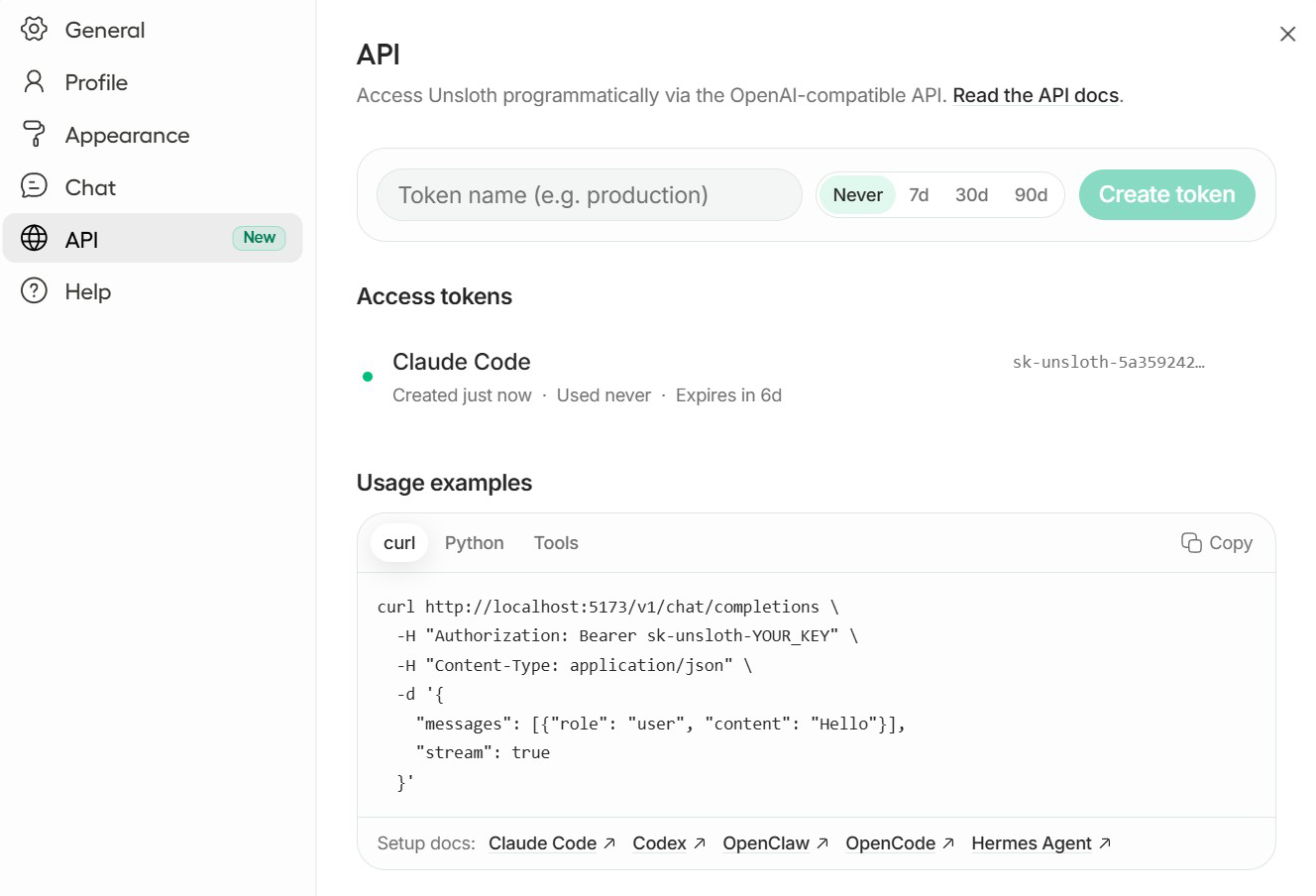
If you have ever attempted to migrate production AI agent workflows from commercial hosted endpoints to on-premise hardware, you know that the fundamental friction point rarely stems from raw model weights or token generation speed. The primary failure mode in local deployment is interface impedance. Modern agent harnesses, evaluation runners, and interactive development environments are written against strict SDK contracts—principally the Anthropic Messages API (/v1/messages) and the OpenAI Chat Completions API (/v1/chat/completions).
When a local runtime forces developers to rewrite prompt templates, re-engineer streaming chunk decoders, and reconstruct JSON schema tool-call parameters, development momentum stalls. Unsloth addresses this systemic bottleneck by transforming locally quantified GGUF checkpoints into high-performance, authenticated local API servers that seamlessly emulate both Anthropic and OpenAI protocols on developer workstations.
Why Dual-Protocol Local Serving Outperforms Single SDK Adapters?
Historically, engineering teams looking to run local models fell into one of two suboptimal patterns. The first pattern relied on client-side translation shims—intermediary libraries that intercept SDK method calls and mutate payload structures before sending raw completions to llama.cpp or text-generation-webui. Client-side adapters frequently suffer from desynchronized schema specifications, fragile event handling during server-sent events (SSE) streaming, and broken multi-turn tool calling protocols.
The second pattern required standardizing entire multi-agent codebases exclusively on OpenAI compatibility, abandoning Claude-native features like native XML tagging hierarchies, prompt caching directives, and explicit tool thought signatures.
1
2
3
4
5
6
7
8
9
10
Client Tier            API Gateway Tier                   Execution Engine
┌────────────────┐     ┌────────────────────────────┐     ┌──────────────────────┐
│ Anthropic SDK  │────▶│ POST /v1/messages          │────▶│ llama.cpp GGUF Core  │
│ (Claude Code)  │     │ - Bearer Token Auth        │     │ - UD-Q4_K_XL Dynamic │
└────────────────┘     │ - XML & Message Formatting │     │ - Dynamic KV Cache   │
                       ├────────────────────────────┤     ├──────────────────────┤
┌────────────────┐     │ POST /v1/chat/completions  │────▶│ Server-Side Sandboxes│
│ OpenAI SDK     │────▶│ - Streaming SSE Parser     │────▶│ - Python REPL Subproc│
│ (Custom Agent) │     │ - Tool Call Schema Parser  │     │ - Terminal Runner    │
└────────────────┘     └────────────────────────────┘     └──────────────────────┘
Unsloth’s local server implementation solves this by hosting an integrated gateway directly in front of optimized quantization backends. As documented in Daniel Han and Michael Han’s architecture for Unsloth Studio, the dual-protocol gateway receives incoming HTTP traffic on standard endpoints, performs cryptographic token verification against local key hashes, unpacks payload schemas into unified abstract syntax trees, and dispatches generation requests to underlying inference kernels with minimal serialization overhead.
For teams building autonomous software agents—as explored in our architectural survey on CLI-Anything Agent-Native Interfaces—having local endpoints that flawlessly mimic cloud production environments guarantees that local debugging reflects exact cloud behavior.
The Architecture of Local Anthropic and OpenAI Protocol Emulation
To comprehend how Unsloth delivers sub-millisecond route dispatching while executing large quantized models like Gemma-4-26B, consider the end-to-end request lifecycle through the Unsloth Studio daemon:
sequenceDiagram
    autonumber
    actor Client as Agent Client (SDK)
    participant GW as Unsloth Gateway (:8888)
    participant Auth as Auth & Token Verifier
    participant Trans as Protocol Translator
    participant Engine as GGUF Inference Engine
    participant Tool as Tool Execution Sandbox

    Client->>GW: POST /v1/messages or /v1/chat/completions
    GW->>Auth: Validate Bearer sk-unsloth-...
    Auth-->>GW: Token Authorized
    GW->>Trans: Ingest Native Messages & Tool Schemas
    Trans->>Engine: Stream Tokens via llama.cpp / vLLM Kernel
    alt Model Emits Tool Call
        Engine-->>Trans: Structured Tool Invocation Block
        Trans->>Tool: Execute Sandboxed Python / Terminal
        Tool-->>Trans: Tool Execution Output
        Trans->>Engine: Append Tool Result to Context
        Engine-->>GW: Synthesize Final Stream
    end
    Engine-->>Client: Stream SSE Events (text/event-stream)
The translation pipeline operates through four modular phases:
- Authentication Interception: The HTTP request header
Authorization: Bearer <token>is matched against an encrypted local keystore managed by Unsloth Studio. Requests with invalid or missing tokens receive immediate401 Unauthorizedresponses before triggering any GPU context locks. - Schema Canonicalization: Incoming Anthropic request objects (containing
system,messages, andtoolswith JSON schemas) or OpenAI request objects (withtoolsof typefunction) are converted into a standardized internal representation. - KV Cache Optimization and Execution: The prompt representation is submitted to the engine kernel, utilizing customized FlashAttention-2 kernels and quantized KV caches to minimize memory consumption over expansive context windows up to 131,072 tokens.
- Multiplexed SSE Emission: As tokens emerge from the model sampling layer, the generator outputs protocol-compliant Server-Sent Events. For Anthropic callers, events match
message_start,content_block_start,content_block_delta, andmessage_delta. For OpenAI callers, chunks follow thechat.completion.chunkspecification with standarddelta.contentanddelta.tool_callspayloads.
Step-by-Step Setup: Installing Studio and Launching Gemma-4-26B GGUF
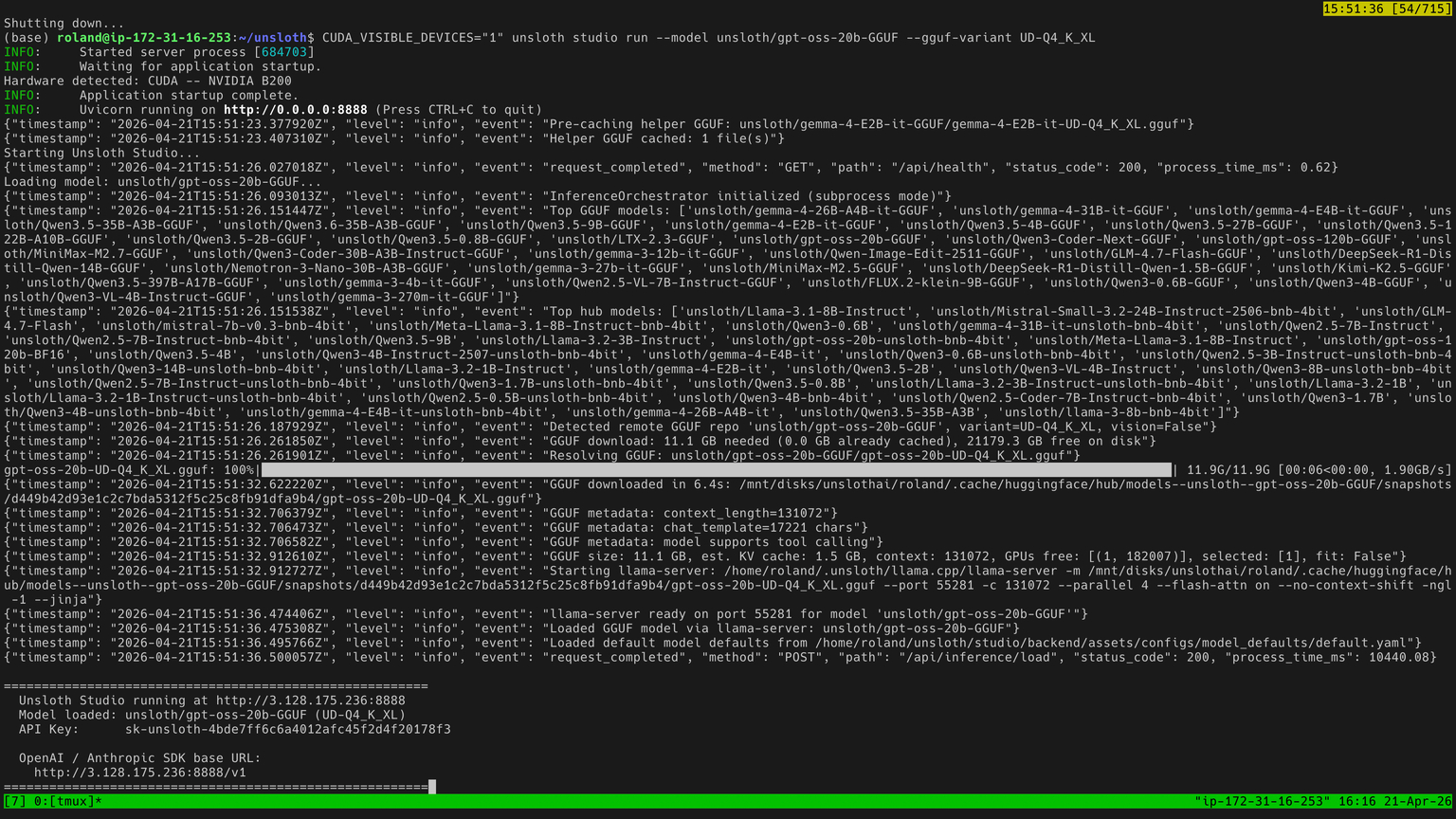
Unsloth provides a unified bootstrapping binary that sets up Python environments, CUDA device drivers, and compiled C++ dependencies without requiring manual compilation of llama.cpp.
Execute the system installer and launch the Unsloth Studio workspace:
1
2
curl -fsSL https://unsloth.ai/install.sh | sh
unsloth studio -p 8888
Once the daemon initializes on port 8888, you can launch a production-grade quantized checkpoint directly from Hugging Face. In this example, we deploy Google’s Gemma-4-26B instruction-tuned model quantized using Unsloth’s ultra-dense UD-Q4_K_XL GGUF profile:
1
unsloth run --model unsloth/gemma-4-26B-A4B-it-GGUF:UD-Q4_K_XL
For environments with specific threading requirements or when configuring deep context buffers for extensive codebase analysis, explicit runtime tuning parameters can be supplied:
1
2
3
4
5
unsloth run \
  --model unsloth/gemma-4-26B-A4B-it-GGUF:UD-Q4_K_XL \
  --context-size 131072 \
  --threads 32 \
  --gpu-layers 99
When deploying across isolated infrastructure or enterprise workstation fleets, Unsloth provides containerized orchestration images:
1
2
3
4
5
6
docker run -d \
  -e JUPYTER_PASSWORD="secure-vault-pass" \
  -p 8888:8888 -p 8000:8000 -p 2222:22 \
  -v $(pwd)/work:/workspace/work \
  --gpus all \
  unsloth/unsloth:latest
Authenticated Routing: API Key Management and Model Discovery
Security boundary hygiene is paramount when exposing inference endpoints on local networks or shared developer servers. Rather than running open, unauthenticated ports that expose GPU hardware to arbitrary prompt injection or resource exhaustion, Unsloth requires cryptographically generated API keys.
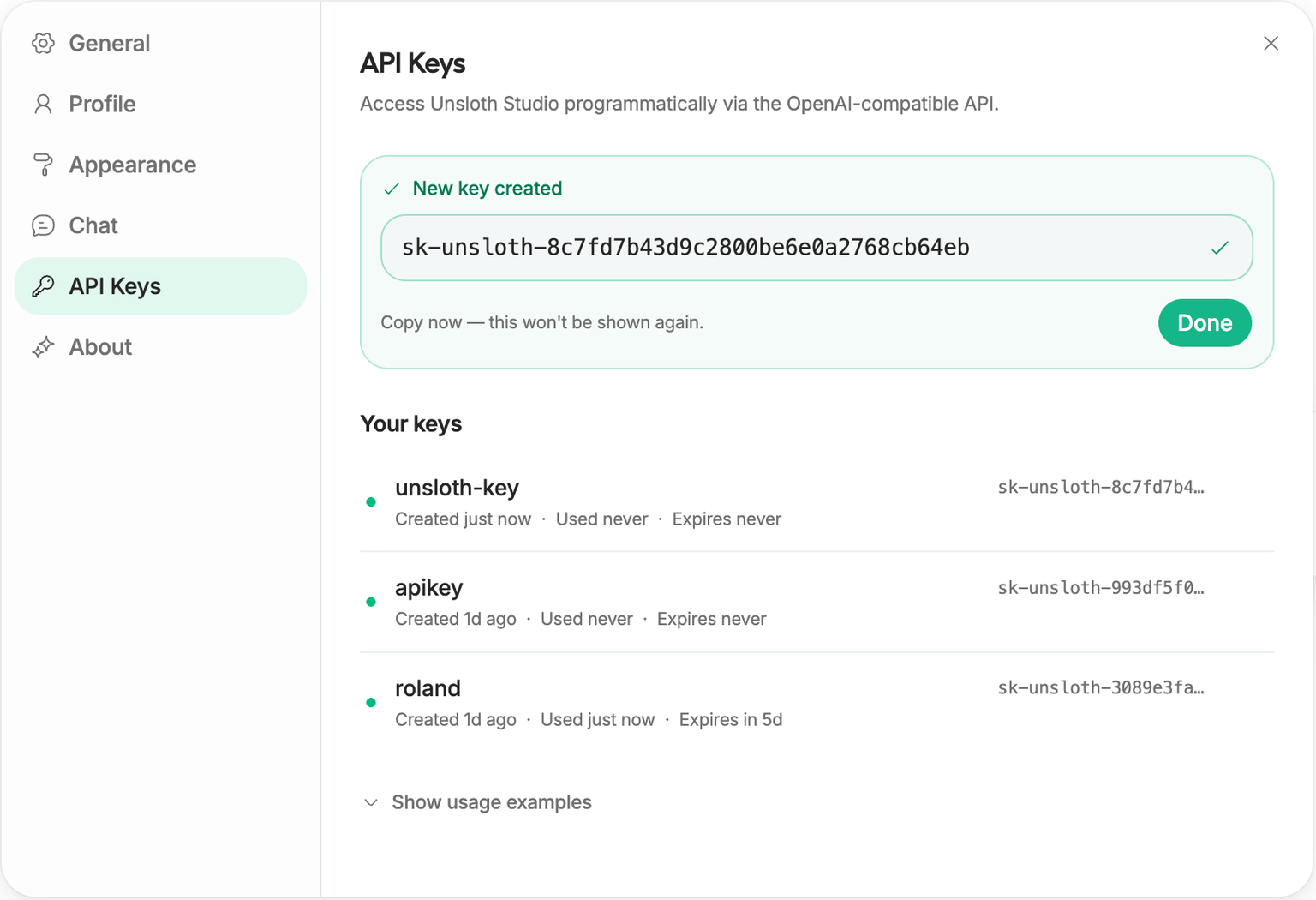
In the Studio web interface:
- Navigate to the avatar menu in the lower-left corner and click Settings.
- Select API and click Generate New Secret Key.
- Copy the resulting key string (
sk-unsloth-...). It is stored hashed on disk and will not be displayed again.
Before configuring programmatic clients, query the model discovery endpoint to ascertain the precise model identifier registered in the active memory space:
1
2
curl -s http://localhost:8888/v1/models \
  -H "Authorization: Bearer sk-unsloth-live-sample-key" | jq .
The output confirms the active endpoint identifier:
1
2
3
4
5
6
7
8
9
10
11
12
{
  "object": "list",
  "data": [
    {
      "id": "gemma-4-26B-A4B-it-GGUF",
      "object": "model",
      "created": 1746446400,
      "owned_by": "unsloth",
      "root": "unsloth/gemma-4-26B-A4B-it-GGUF:UD-Q4_K_XL"
    }
  ]
}
The string present in the id property must be supplied identically to client configuration constructors.
Dual Client Implementation: Python Anthropic vs OpenAI Streaming Harnesses
The defining operational advantage of the Unsloth API server is that consumer applications use the official vendor SDKs without proprietary vendor shims or monkey-patching.
1. OpenAI-Compatible Streaming Client
When integrating with tools built on OpenAI conventions, instantiate the standard OpenAI client pointing base_url to the /v1 prefix:
1
2
3
4
5
6
7
8
9
10
11
12
13
14
15
16
17
18
19
20
21
22
23
24
25
26
27
28
29
30
from openai import OpenAI

client = OpenAI(
    base_url="http://localhost:8888/v1",
    api_key="sk-unsloth-live-sample-key",
)

def stream_code_generation(prompt: str) -> None:
    stream = client.chat.completions.create(
        model="gemma-4-26B-A4B-it-GGUF",
        messages=[
            {
                "role": "system",
                "content": "You are an expert systems engineer specializing in Rust and C++.",
            },
            {"role": "user", "content": prompt},
        ],
        temperature=0.1,
        stream=True,
    )

    print("--- Streaming Local Inference Tokens ---")
    for chunk in stream:
        delta = chunk.choices[0].delta
        if getattr(delta, "content", None):
            print(delta.content, end="", flush=True)
    print("\n----------------------------------------")

if __name__ == "__main__":
    stream_code_generation("Implement a thread-safe ring buffer in Rust with zero allocation.")
2. Anthropic-Compatible Messages Client
For workflows designed around Claude’s message structure, such as automated code refactoring and agentic harnesses (as analyzed in Agentic Engineering 9 Skills), point the official Anthropic client directly to the root host:
1
2
3
4
5
6
7
8
9
10
11
12
13
14
15
16
17
18
19
20
21
import anthropic

client = anthropic.Anthropic(
    base_url="http://localhost:8888",
    api_key="sk-unsloth-live-sample-key",
)

response = client.messages.create(
    model="gemma-4-26B-A4B-it-GGUF",
    max_tokens=1024,
    temperature=0.2,
    system="Analyze software architecture trade-offs with rigorous mathematical precision.",
    messages=[
        {
            "role": "user",
            "content": "Compare write amplification in LSM-trees versus B+ trees under random 4KB writes.",
        }
    ],
)

print(response.content[0].text)
Both clients hit the same running model weights in memory without restarting the runtime or swapping GPU contexts.
Server-Side Tool Calling and Execution Sandboxing
A critical challenge when operating local LLMs in agent loops is tool execution latency. In traditional setups, every tool invocation requires round-tripping back to the client application, running the command, and sending results back in a subsequent prompt.
Unsloth includes native, server-side tool orchestration capabilities. By toggling enable_tools: true, the gateway can parse function calls, evaluate them inside a sandboxed local environment (e.g., Python execution or terminal command inspection), and feed the output directly into subsequent generation turns before returning a final response:
1
2
3
4
5
6
7
8
9
10
11
12
13
14
15
16
curl -N -s http://localhost:8888/v1/chat/completions \
  -H "Authorization: Bearer sk-unsloth-live-sample-key" \
  -H "Content-Type: application/json" \
  -d '{
    "model": "gemma-4-26B-A4B-it-GGUF",
    "messages": [
      {
        "role": "user",
        "content": "Calculate the eigenvalue decomposition of a 3x3 Hilbert matrix. Use Python to verify."
      }
    ],
    "stream": true,
    "enable_tools": true,
    "enabled_tools": ["python", "terminal"],
    "session_id": "unsloth-audit-session-01"
  }'
This server-side loop eliminates substantial network overhead and dramatically speeds up deterministic computation steps in complex research and data science tasks. Compare this to the specialized local model paradigms examined in LocalCowork LFM2-24B and broader inference performance patterns detailed in LLM Inference Patterns.
How Unsloth Inference and Post-Training Evolved Across 2026
Throughout late 2024 and early 2025, Unsloth was predominantly known across the open-source machine learning community as an ultra-fast parameter-efficient fine-tuning library (PEFT/LoRA). Its hand-written OpenAI Triton GPU kernels yielded 2x to 5x training speedups while slashing VRAM footprints by up to 80%.
Across 2026, the project underwent a decisive strategic evolution:
1
2
3
4
5
6
2024: PEFT Focus           2025: Kernel Maturation         2026: Unified Inference & Post-Training
┌──────────────────┐       ┌──────────────────────┐        ┌───────────────────────────────────┐
│ LoRA / QLoRA     │──────▶│ Custom GGUF Exporter │───────▶│ Unsloth Studio & Dual Protocol API│
│ Triton Kernels   │       │ Dynamic Quantization │        │ Native Tool Execution Sandboxing  │
│ 80% VRAM Savings │       │ FlashAttention-3     │        │ Speculative Decoding & Serving    │
└──────────────────┘       └──────────────────────┘        └───────────────────────────────────┘
- Bridging Training and Inference: Historically, after fine-tuning an adapter with Unsloth, practitioners had to export weights, convert them through
llama.cppscripts, create GGUF files, and configure external serving stacks like vLLM or Ollama. In 2026, Unsloth collapsed this pipeline into a single continuum: models trained in Unsloth can be exported to dynamic quantized GGUF profiles and immediately served through Unsloth Studio without leaving the runtime. - Dynamic Multi-Quantization Schemes (UD-Q4): Rather than applying uniform 4-bit precision across all tensor layers, Unsloth’s 2026 quantizer dynamically preserves higher bit-precision (e.g., 6-bit and 8-bit) on critical attention heads and router gates in Mixture-of-Experts (MoE) architectures, while aggressively quantizing feed-forward layers. This maintains near-FP16 benchmark accuracy at Q4 memory footprints.
- Speculative Decoding and Layer Streaming: For hardware configurations with constrained unified memory (such as 16GB–32GB Apple Silicon or consumer RTX cards), Unsloth integrated layer-streaming and speculative draft decoding. A compact 1B–2B parameter draft model generates candidate tokens, which are verified in parallel batches by the primary 26B model, increasing decoding throughput by 1.8x to 2.4x.
Key Takeaways
- Eliminates SDK Friction: Unsloth provides drop-in compatibility for both Anthropic (
/v1/messages) and OpenAI (/v1/chat/completions) protocols, enabling teams to redirect existing agent software without modifying client-side libraries. - Enterprise-Grade Local Security: Mandatory bearer token authentication prevents unauthenticated network exposure, providing robust boundary protection when sharing workstation inference resources.
- Quantization Without Fidelity Collapse: Advanced dynamic quantization profiles (such as
UD-Q4_K_XL) preserve critical attention matrices while fitting 26B+ models into consumer hardware memory bounds. - Unified Post-Training and Serving: The traditional wall between fine-tuning pipelines and inference deployment has dissolved; Unsloth enables immediate transition from adapter training to authenticated local serving.
New Questions
- How do streaming latency and time-to-first-token (TTFT) metrics in Unsloth Studio compare against dedicated C++ daemon runners (such as bare
llama.cppserver) when handling concurrent agent sessions? - What are the formal boundary guarantees and process isolation limits of the built-in server-side tool sandbox when executing untrusted agent code locally?
- Will the open-source community converge on standardized multi-provider proxy layers directly embedded in agent frameworks, or will local server-level emulation remain the dominant paradigm?
References
- Han, D., & Han, M. (2024–2026). Unsloth: Fast and Memory-Efficient Language Model Fine-Tuning and Inference. Unsloth AI Documentation. https://unsloth.ai/docs/basics/api (accessed 2026-10-18).
- Gerganov, G., et al. (2023–2026). llama.cpp: Port of Facebook’s LLaMA model in C/C++ with GGUF Support. GitHub Repository. https://github.com/ggerganov/llama.cpp (accessed 2026-10-18).
- Anthropic. (2024–2026). The Messages API Reference and Streaming Event Specifications. Anthropic Documentation. https://docs.anthropic.com/en/api/messages (accessed 2026-10-18).
- OpenAI. (2023–2026). Chat Completions API and Function Calling Specifications. OpenAI Platform Documentation. https://platform.openai.com/docs/api-reference/chat (accessed 2026-10-18).
Editorial method: claims in this article point to primary documentation, pinned source code, runnable checks, or dated measurements, with AI-assisted research under the site's evidence-gated policy. How this site verifies claims and discloses AI assistance · Report a correction.
Working on something like this?
I take a small number of paid, scoped reviews: AI agent/RAG architecture diagnosis, Unity CI & build-automation audits, and multimodal QA design review. Each one ends in a written findings document.
Work with me