AI
Godot Editor Preview Is Not Runtime Scene Evidence
Godot documents its preview environment as editor-only. A pinned documentation and source audit separates viewport presentation from scene resources and runtime proof.
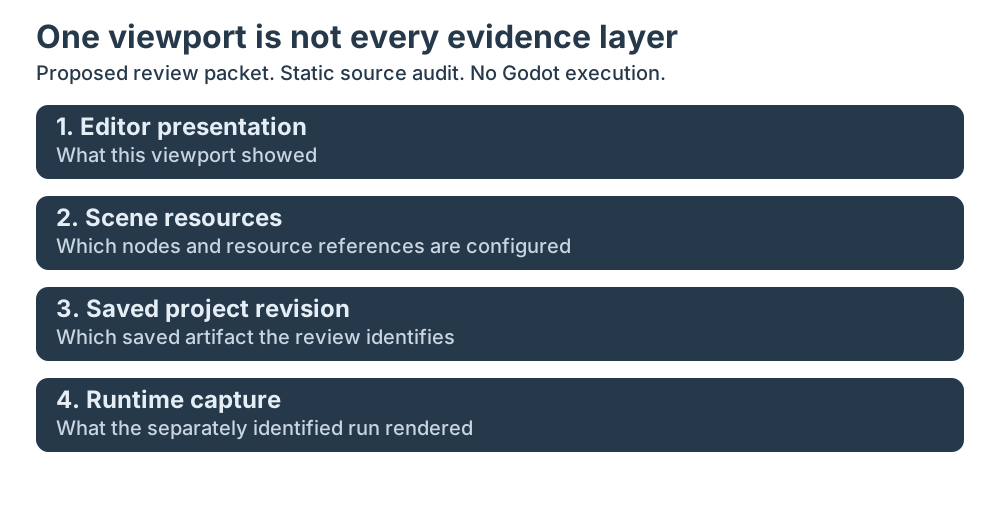
What did that preview actually prove?
A Godot scene can look finished in the 3D editor while the running project shows a different sky, lighting setup, or camera view. The tempting explanation is often that the engine ignored a setting. Before changing render code, ask a more basic question: was the visible environment part of the scene at all, or was it an editor preview helping someone work?
That distinction matters whenever a screenshot is used in a bug report, review, tutorial, or acceptance check. An image can faithfully show what the editor displayed without showing what the saved scene contains, and neither fact alone establishes what a running project rendered. The Godot documentation makes that boundary unusually explicit: its preview sun and sky are visible in the editor, not in the running project.
Technical Analysis: What the pinned sources say
I read Godot’s environment documentation at the pinned documentation revision 9adca4c1c72917bfe1b7be3108abed5ce26696a6 and followed the relevant implementation in Godot Engine source pinned to 5b4e0cb0fd279832bbdd69fed5354d4e5ad26f88. This was a static documentation and source review. I did not build Godot, open an editor, run a project, or capture runtime output.
The documentation describes Environment as a resource for rendering properties such as the sky, ambient lighting, tone mapping, effects, and adjustments. It also says the resource does nothing by itself: it must be used in a supported place. The documented priority order distinguishes a high-priority Environment on a Camera3D, a recommended WorldEnvironment node, and the low-priority editor preview. The last is displayed when the current scene has neither a WorldEnvironment node nor a DirectionalLight3D node. The preview can be disabled from controls at the top of the 3D editor.
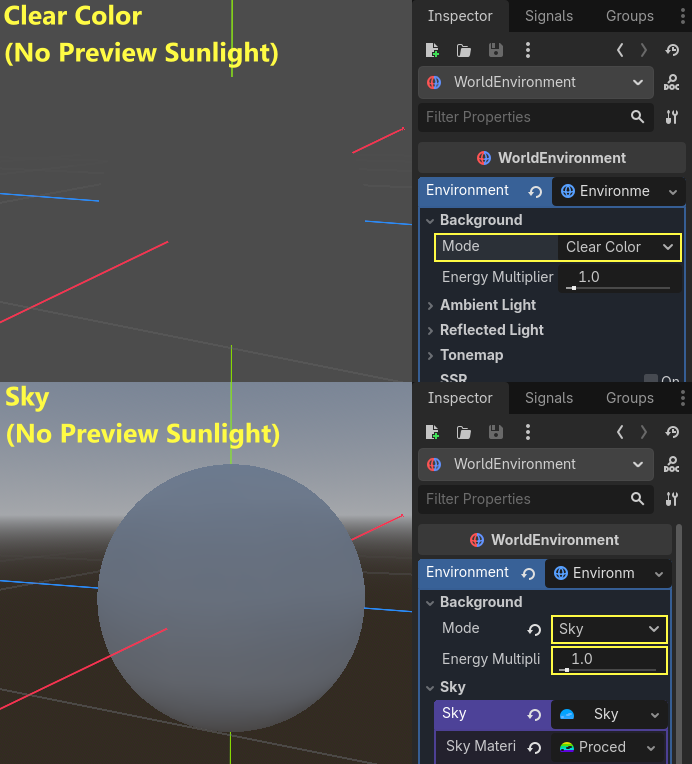

This is not a claim that a particular project is misconfigured. It is a documented distinction between an Environment resource and a low-priority editor convenience. In particular, a screenshot of the preview cannot establish that an Environment resource was assigned to a scene node, that the scene was saved after a change, or that the running project used those values.
The implementation gives a second, narrower piece of evidence. In the pinned Node3DEditorViewport::_toggle_camera_preview path, enabling camera preview selects the preview camera and attaches its camera to the editor viewport. Disabling that preview restores the editor viewport’s ordinary camera. The function rejects enabling without a preview camera or disabling without an active preview before changing the viewport. This camera-preview function is not the implementation of the sun-and-sky controls; I use it only as a separately scoped editor-viewport example. This source trace supports a statement about how this editor control routes the editor viewport. It does not prove what a separate game process renders, and I did not execute this code.

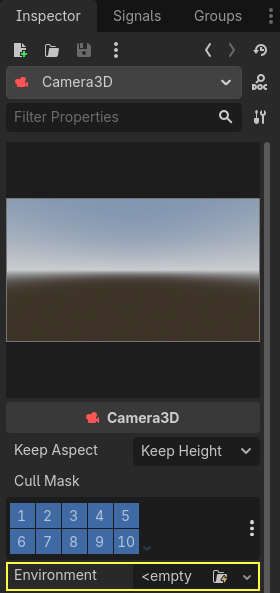
A separate documentation image shows the Environment slot on a Camera3D, visibly labelled <empty>. It illustrates where a resource can be assigned, not an already completed assignment. That matters because the resource location is not just a visual detail: the docs assign it a higher priority than other environment sources. The scene tree and resource assignment are evidence of project configuration; the screenshot is useful orientation for where a setting can live, but it is not proof that the project shown in some other screenshot has the same assignment.

The preview settings dialog adds another useful distinction. Godot documents controls that can add the preview sun or Environment into the scene as nodes; holding Shift while using either add action adds both. That is a workflow for moving from a temporary editor aid toward explicit scene content. It is not evidence that those actions were taken in a particular project. The scene after the action, and then the project when run, are separate things to inspect.
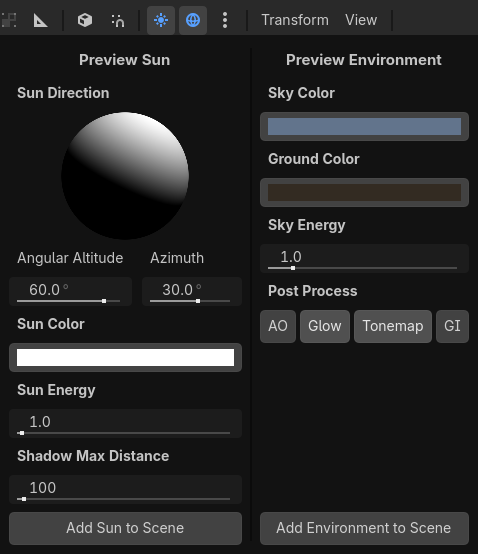

The source boundaries are worth keeping precise. Documentation states the editor-only limitation. The source code trace shows the camera preview wired to the editor viewport. Together, they support the narrow finding that an editor preview is not runtime scene evidence. They do not establish a regression, a rendering defect, or the behavior of every Godot version and project configuration.
A small evidence packet for scene reviews
I would separate a visual review into four evidence layers rather than ask one screenshot to answer every question:
| Evidence layer | Narrow question it can answer | What remains unproved by that layer alone |
|---|---|---|
| Editor presentation | What did this viewport show? | Saved resource wiring and runtime output |
| Scene resources | What nodes and resource references are configured? | Whether the inspected state was saved and used in a run |
| Saved revision | Which project artifact is under review? | What a running process actually rendered |
| Runtime capture | What did the identified run display? | Every other scene, renderer or engine version |
- Editor presentation: What did the editor viewport show, and were preview controls active? A screenshot can answer this limited question.
- Scene resources: Which nodes and resources are actually assigned? Inspect the scene tree and the saved scene/resource references, including whether a WorldEnvironment or DirectionalLight3D is present and which Environment is assigned.
- Saved project state: Confirm that the relevant scene and resource changes were saved and belong to the project revision under review. A visible unsaved editor state is not the same thing as a committed project artifact.
- Runtime result: Run the identified project with the intended engine/version and record the scene, settings, and output capture. This is the evidence needed to make a claim about what the project rendered at runtime.
This is a proposed QA packet, not a Godot standard and not a check I executed. It is deliberately modest: preserve the editor screenshot as context, but pair it with the scene/resource evidence and a separately identified runtime capture when the claim concerns runtime output. If the project was not run, say so. If the scene file was not inspected, do not infer its contents from the viewport.
That discipline is useful beyond environment previews. A preview, gizmo, imported-asset thumbnail, shader editor, or material swatch can help an author make a change, but the visible helper and the saved project state answer different questions. A useful review names the artifact and state that each piece of evidence actually observes.
For a related Godot measurement example, see why Physics Time keeps the slowest sampled step rather than the sum. For a broader example of separating a proposal, commit, and trace, see the D-073 proposal-to-commit gate audit. The BlenderProc depth and antialiasing measurement path is another useful case where a rendered image should not be mistaken for evidence about an unobserved measurement stage.
The practical question to carry into the next review is simple: what exact state does this artifact prove? If the answer is only “the editor displayed this,” that is still valuable evidence. It just is not a substitute for the scene file or a runtime result.
Key Takeaways
- The pinned documentation calls the preview sun and sky editor-only, not runtime output.
- The Camera3D image shows an empty slot, not a successfully assigned Environment.
- Camera-preview routing is a separately scoped static source example, not implementation proof for the environment-preview controls.
- The four-layer packet is a proposed review aid. No Godot project was built or run here.
New Questions
- Which engine revision, scene revision and active camera would a runtime capture need to identify in a particular project?
- How should a team retain scene/resource evidence when an editor screenshot shows changes that have not yet been saved?
These are follow-up review questions, not results from a test I performed.
References
- Godot documentation, Environment and post-processing, pinned to 9adca4c1c72917bfe1b7be3108abed5ce26696a6.
- Godot Engine, 3D editor viewport implementation, pinned to 5b4e0cb0fd279832bbdd69fed5354d4e5ad26f88.
- Godot documentation repository README and license, which states that content outside classes/ is CC BY 3.0 and attributes it to Juan Linietsky, Ariel Manzur and the Godot community.
Editorial method: claims in this article point to primary documentation, pinned source code, runnable checks, or dated measurements, with AI-assisted research under the site's evidence-gated policy. How this site verifies claims and discloses AI assistance · Report a correction.
Working on something like this?
I take a small number of paid, scoped reviews: AI agent/RAG architecture diagnosis, Unity CI & build-automation audits, and multimodal QA design review. Each one ends in a written findings document.
Work with me