AI
Krita Color Smudge changes what brush spacing means
A source audit of why lower spacing smooths Smearing but strengthens Dulling, with a mode-first preset handoff and an unexecuted comparison plan.
| **Source Audit | Game-art workflow | Documentation evidence, not a painting benchmark** |
Editorial additions: AI-assisted Fodev JEO editorial article, 2026. Publisher: Fodev JEO. Original documentation authors: Wolthera van Hövell tot Westerflier, Raghavendra Kamath, Scott Petrovic, ValerieVK, and Peter Schatz. Their names credit the source material, not endorsement of this analysis.
Copyright in source material remains with the Krita Manual contributors. Copyright (c) 2026 Jang Young Jeong, original editorial additions. Article-specific distribution terms: Permission is granted to copy, distribute and/or modify this document under the GNU Free Documentation License, Version 1.3 or any later version published by the Free Software Foundation, with no Invariant Sections, no Front-Cover Texts, and no Back-Cover Texts. See the complete license and rights notice.
Why does the same spacing change feel different?
Should a game artist reduce brush spacing when a color transition looks rough? In Krita’s Color Smudge Brush, the useful answer starts one decision earlier: which mode is doing the mixing?
The official manual describes a meaningful asymmetry. Reducing spacing makes Smearing smoother, but makes Dulling more opaque. Spacing is not merely a shared “quality” slider. It changes how often the selected mixing process samples and deposits paint. A preset handoff that records spacing without the mode leaves out the information needed to interpret the setting.
That is the reader decision here: choose between carrying existing surface detail and mixing sampled color into the brush dab before tuning spacing. For a game-art team, I would treat that choice as part of the asset-production recipe, not an incidental brush preference. This is a workflow recommendation derived from documentation, not a claim that I painted a shipped asset with it.
The research package inspected the official manual and its source at documentation commit 87d1c035, inspected the four illustrations below, and compared downloaded image bytes with the immutable repository copies. The rendered manual reports revision f04d5f9; its Color Smudge source text matches the pinned source exactly. The pin identifies documentation, not Krita executable code. This is not a new-release report.
Technical Analysis: one slider, two mixing operations
Smearing carries an area; Dulling fills a dab
The manual defines Smearing as copying the area underneath the previous brush position onto the new position, taking opacity into account. It defines Dulling as picking the color under the dab, using Smudge Radius where applicable, and filling the dab with that color before applying color and opacity.
Those descriptions explain why “make the blend stronger” is an underspecified request. Are you trying to carry an existing edge along a stroke, or retain a brush shape while changing the color it lays down? The manual also says Dulling preserves the brush shape and size, unlike the size fade it describes for Smearing. That distinction makes the mode a better first decision than a numeric strength adjustment.
The following table is my synthesis of the documented behaviors, not a set of measured results.
| Decision | Smearing | Dulling | What to record in a preset handoff |
|---|---|---|---|
| What is transferred? | Area from the previous brush position | Sampled color used to fill a dab | Mode, not just engine name |
| What does lower spacing emphasize? | Smoother smearing | Greater opacity / stronger dulling | Spacing together with mode and opacity |
| Does Smudge Radius provide the documented sampling control? | The manual’s comparison labels it not applicable | It expands the sampled radius | Radius only with its applicable mode |
| What survives in the trail? | Existing surface structure can be dragged | The brush shape is preserved | Tip shape and dynamics, not merely color |
Spacing changes the number of opportunities to mix
The manual explicitly connects spacing to the number of dabs and therefore samples. Its recommendation for Dulling is not simply to minimize spacing: increase it as much as possible without a choppy stroke. The manual associates this with brush speed, but I did not measure latency and would not attach a performance number to the advice.
My engineering interpretation is narrower: a parameter cannot be evaluated independently of the operation it controls. If a Dulling preset becomes too opaque after a spacing change, increasing the same “smoothness” adjustment again may be answering the wrong question. Restore the baseline and compare the mixing behavior, rather than assuming that more samples only improve the same output.
Separate radius from transparency
Smudge Radius is documented as a larger sampling radius for Dulling, expressed relative to brush size. The upstream comparison gives an explicit control: the top Smearing stroke is marked N/A.
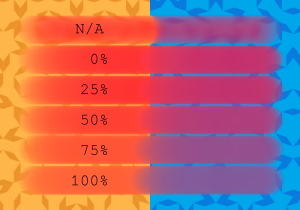

That is not the same control as Smear Alpha, which concerns whether transparency in the smeared pixels is taken into account. A stroke that looks more opaque after changing transparency handling is not evidence that the sampling radius changed.


These figures are useful because they keep different explanations apart. They are not an experiment I ran, and their visual appearance does not establish a universal best setting for a texture, sprite, or concept painting.
Scatter is another sampling change, not decoration
The manual warns that Smearing can pick up the hard lines of its rectangle example. It also explains that Scatter picks up colors within a distance rather than only directly under the brush.
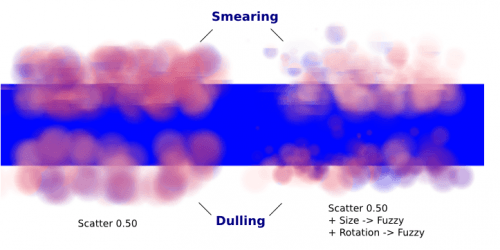

For a painted game asset, that suggests a practical debugging question: did an unwanted edge come from the sampled image content, rather than from the chosen foreground color? That is an inference worth testing, not a diagnosis of an unseen painting. The right-hand example also changes size and rotation dynamics, so it must not be presented as a controlled measurement of Scatter alone.
Hand off a mixing recipe, not a brush number
My proposed handoff is small: record the mode, brush tip, spacing, opacity, Color Rate, Smudge Length, applicable Smudge Radius, Smear Alpha, dynamics, and algorithm-toggle state, together with the Krita version. Color Rate is the documented foreground-color contribution; it should not be silently equated with the amount of existing paint being moved. The manual describes version-dependent algorithm interactions, so the toggle state belongs in the record even though this article does not prescribe a checkbox position.
The upstream tutorial provides examples of the distinct visual jobs rather than one universally superior mode.
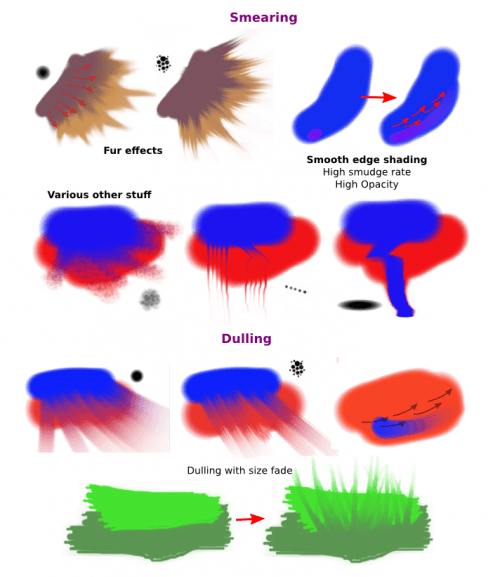

Here is the test I would ask a teammate to run before adopting a shared preset. It is a proposed procedure, not a completed test.
- Make one small test patch containing a hard color boundary, a textured region, and a transparent edge. Keep it unchanged between trials.
- Duplicate the starting preset. Record its version and settings before changing anything.
- Compare Smearing and Dulling on the same patch. Describe the difference in carried edge detail and retained dab shape rather than scoring one as “better.”
- Within each mode, change only spacing. Record both smoothness and opacity, because the documented trade-off is not identical.
- If evaluating Dulling’s color pickup, vary radius separately. Keep Smear Alpha fixed during that comparison.
- Add Scatter or other dynamics only after choosing the baseline. Save the test patch and preset together.
The useful artifact is an explainable decision: “This preset preserves dab shape and mixes the sampled color,” or “This preset drags existing texture.” A saved number is supporting configuration, not that decision by itself.
This is the same handoff principle explored in CozyClay’s shot contract: preserve the authored state that gives a result meaning. For a separate source-audit example of a setting changing the underlying operation, read BlenderProc’s depth flag changes the measurement pipeline. Neither link is evidence for Krita behavior.
Key Takeaways
- Choose the mixing mode before optimizing spacing. The manual gives lower spacing different consequences in Smearing and Dulling.
- Keep color pickup, transparency handling, and foreground-color contribution separate during diagnosis.
- Preserve the preset and test patch with a written reason for the chosen mode. The procedure above is a proposal awaiting runtime validation.
- The four figures are credited upstream documentation assets, not personal artwork or benchmark output.
New Questions
How closely do these documented behaviors match a particular installed Krita version and tablet configuration? Which spacing remains acceptable at the brush sizes used in a real asset pipeline? How do lightness or gradient brush-tip modes change the preferred setup? Those require controlled runtime work beyond this audit.
I also found differently worded Smudge Length checkbox guidance within the manual. This article deliberately does not resolve it into a universal “checked means” rule. That question should be tested or traced against a specific executable version before becoming team instructions.
History
Original source: Color Smudge Brush Engine, Krita Manual, by the five credited authors above, published by Krita Manual contributors. This review uses the source state at commit 87d1c035f7db9696eae7badfe9ac38a7eb6bf984, committed August 31, 2026; that is not an image creation date. The original transparent source and manual page remain available.
Modified document: Krita Color Smudge changes what brush spacing means, 2026. AI-assisted editorial additions published by Fodev JEO. Added the decision analysis, comparison table, and unexecuted test plan; selected four illustrations; removed only Software metadata from the Radius publication copy. Full details and the preserved original source are in the rights notice.
References
Official documentation
Rights and source preservation
- Immutable image-licensing scope in the contribution guide
- Immutable repository license
- Included full GFDL 1.3 text
- Attribution, modifications, and source history
Preserved source
Unchanged original RST source. The GFDL terms apply to this article package only; they do not change the site-wide license.
Editorial method: claims in this article point to primary documentation, pinned source code, runnable checks, or dated measurements, with AI-assisted research under the site's evidence-gated policy. How this site verifies claims and discloses AI assistance · Report a correction.
Working on something like this?
I take a small number of paid, scoped reviews: AI agent/RAG architecture diagnosis, Unity CI & build-automation audits, and multimodal QA design review. Each one ends in a written findings document.
Work with me