AI, Agents
OpenContext: Stable IDs Point to Current Files, Not Snapshots
A source audit separates OpenContext’s Markdown store, agent guidance, manifest metadata, stable IDs and indexed search, without claiming automatic memory or benchmark gains.
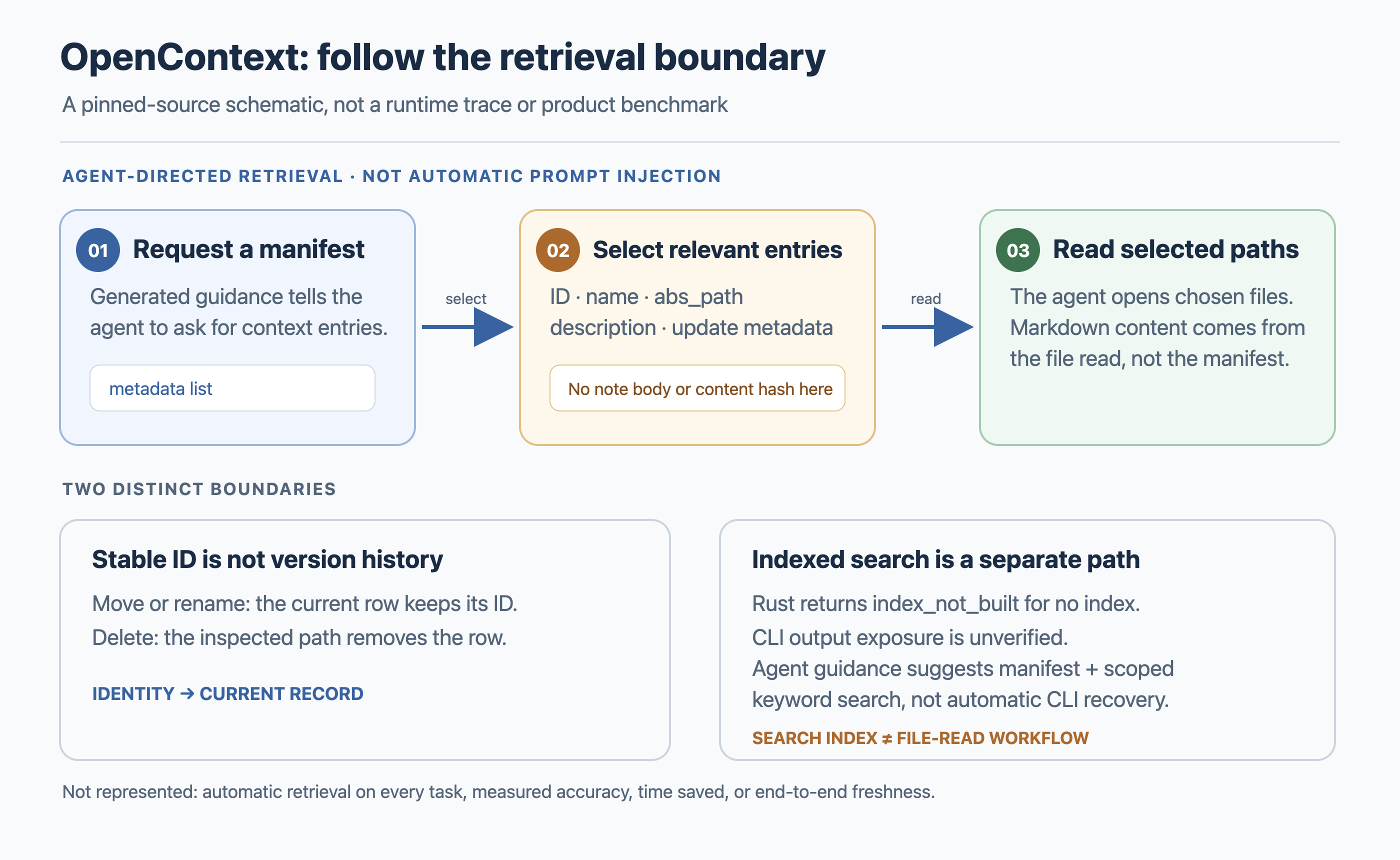
OpenContext describes itself as a personal context and knowledge store for AI assistants, with “persistent memory” and less repeated explanation as product framing. That shorthand can blur several different behaviors: saving a note, helping an agent find it, reading its contents, and searching an index. Those are separate steps in the implementation I inspected.
I pinned the source review to OpenContext commit 0649e713 and compared it with the current usage guide. This is a source audit, not a product installation or runtime test. The narrower conclusion is still useful: OpenContext provides persistent files and an agent-facing route for finding and reading them, but the inspected code does not establish that every relevant note is automatically loaded into every task.
The editable SVG source is available separately.
Does OpenContext automatically load the right memory?
The current guide separates three paths: the Desktop app, the CLI with agent integrations, and the CLI by itself. For the CLI-plus-agent route, the guide describes oc init generating user-level commands or skills and MCP configuration, alongside project guidance. That is a meaningful bridge between a knowledge store and the coding tools a person already uses.
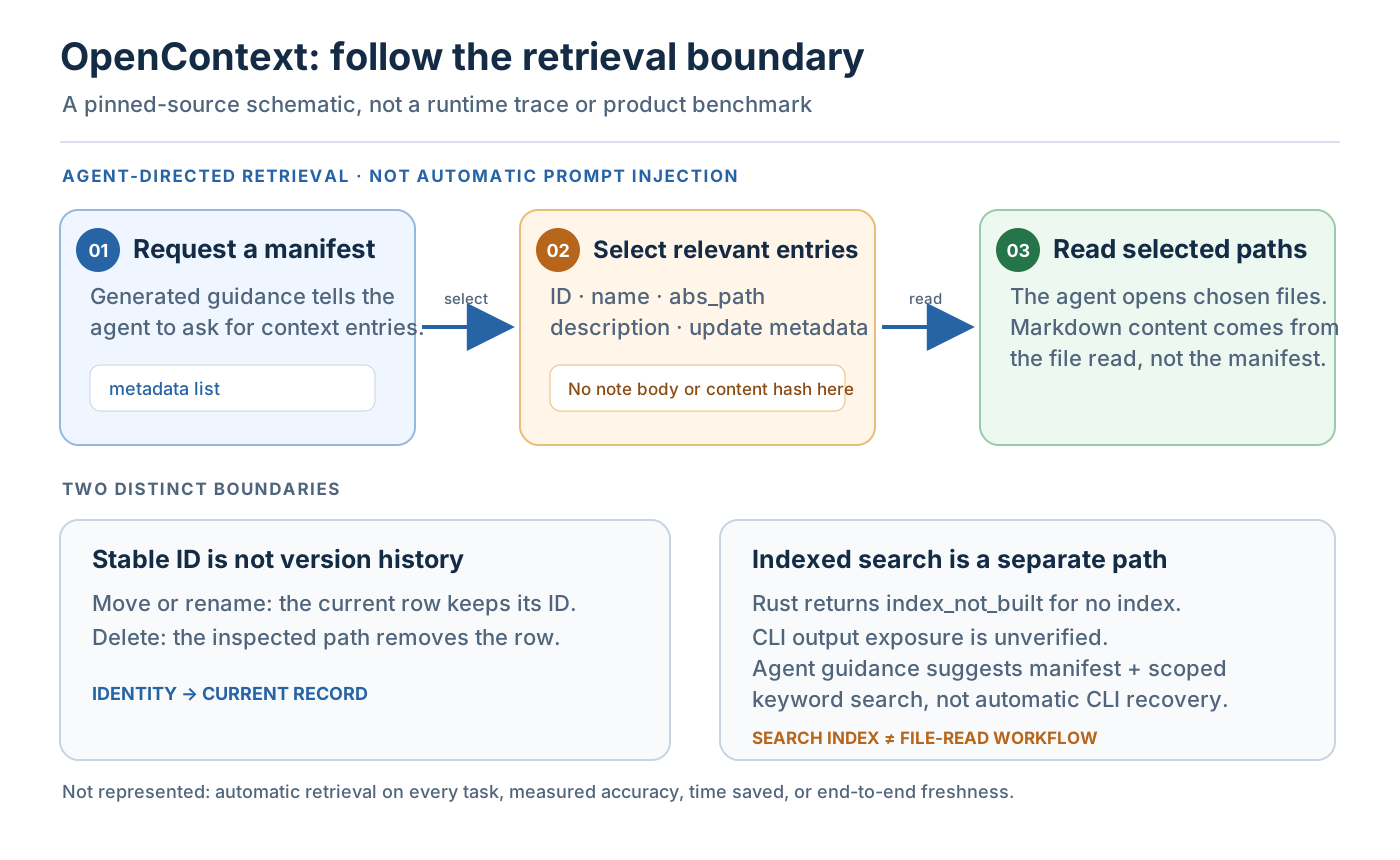
The implementation detail that matters is what the generated instructions ask the agent to do. In the pinned agents.js, the workflow is to request a context manifest, select relevant entries, then read their abs_path values. The instructions can make a deliberate context-first habit easier. But generated instructions are not the same thing as the product placing every note into every prompt. The agent still has to invoke the right command or tool, select the useful entries, and read them.
That distinction changes the question I would ask before adopting it. Instead of “Does this give my agent memory?”, ask “Which integration runs before this task, what does it retrieve, and where can I inspect the instructions?” A user-level skill can be available without being used. A project instruction can request a retrieval step without proving that every agent follows it. The docs show the intended workflow; they do not measure how consistently a particular model or editor will follow it.
A manifest is a list, not the note itself
The manifest is a navigation layer. The inspected record includes metadata such as an identifier, name, path and description. The manifest-generation path returns those fields so an agent can decide which document to read. It does not include the Markdown body or a content hash in the representation I inspected. The record fields are in the pinned core source, and the manifest generation query shows what the manifest response includes.
This is a simple but important boundary. A manifest tells an agent where a candidate note lives; the later file read supplies the note’s contents. If you see a document in the manifest, that is not evidence that the model has already read it. If a file changes after discovery, the manifest is not a frozen copy of the previous text. The source review did not test concurrent edits, so I would not make a stronger claim about what happens if the file changes between listing and reading.
This file-first model is useful when a team wants inspectable Markdown and explicit selection. It also means the quality of retrieval depends on the instructions and selection step, not only on the fact that the files exist. A store can preserve a decision perfectly and still fail to surface it for a task that never asks for the right context.
Stable IDs follow a current record, not its history
OpenContext’s stable identifier is useful, but “stable” needs a precise meaning. In the inspected resolver, an ID looks up the current document record. The move and rename paths update that record while retaining the identifier; the delete path removes it. The resolver lookup is in the pinned document resolver; the move, rename and delete operations show how the current row changes.
That behavior makes an ID a practical way to keep referring to a document when its path changes. It does not, by itself, make the ID a versioned snapshot. A stable handle can resolve to the current row without preserving every earlier body. If your workflow needs audit history, immutable citations, or restore points, verify those capabilities separately rather than inferring them from the word “stable.” I inspected the relevant code paths but did not execute a rename, delete, restore or history workflow.
The distinction is familiar from other systems: a database key identifies a record; it is not automatically a revision identifier. For OpenContext, the inspected code supports the record-identity interpretation. A team can still build useful habits around that identity, but it should decide separately where durable history and reviewable changes belong.
Search is separate from reading, and freshness is separate from an interval
The CLI’s search path and the manifest-based read path solve different problems. In the pinned Rust Searcher::search, the missing-index branch returns SearchResults::index_not_built after successful searcher initialization. The CLI search command calls the JavaScript searcher, and the native adapter normalizes response.results. I did not establish that the Rust status reaches CLI output. Separately, the generated agent guidance recommends a manifest plus scoped local keyword search when the index is missing; the specific search instructions describe manifest-based triage after a failed search. That is manual agent guidance, not evidence of automatic CLI recovery.
There is also one code-and-documentation question worth checking on the exact release you plan to run. The JavaScript wrapper initializes a native searcher and passes the selected mode into it. In the pinned Rust searcher constructor, the searcher builds an embedding client, whose constructor validates API-key configuration, while the usage guide says keyword search does not require embeddings. Read together, these sources suggest the key check may happen before the keyword mode is dispatched. That is a static source inference, not a reproduced failure. I did not run a keyless keyword query, so treat it as a test question, not a product verdict.
The index-sync code also has a default 300-second interval (pinned source). That number describes an implementation setting; it is not a freshness service-level agreement. It does not prove that a newly edited note becomes searchable within five minutes. End-to-end freshness would need to be measured from a real file change through indexing to a successful query, on the version and configuration a team actually uses.
| Path | What the pinned source shows | What it does not establish |
|---|---|---|
| Agent-guided file read | Instructions ask for a manifest, selection and reads of chosen paths. | Automatic loading of every relevant note into every task. |
| Indexed search | The Rust search method has a missing-index response branch; whether it reaches CLI output is unverified. Generated guidance separately recommends a manifest plus scoped keyword search. | A CLI-visible status, automatic CLI fallback or a five-minute freshness promise. |
| Stable record ID | Move and rename paths preserve the current row’s ID; delete removes the row. | Immutable historical versions or restore points. |
| Index-sync interval | A 300-second default appears in the pinned code. | A freshness SLA or measured time-to-search. |
What changed in my reading since the January note
The software is not being presented here as newly changed. What changed is the evidence boundary in this rebuild. The old post grouped storage, MCP, generated skills, the desktop UI and agent behavior into one “persistent memory” story. The current usage guide distinguishes setup paths, and the pinned code makes the manifest-to-file-read step visible. That lets me say what the implementation supports without treating an intended workflow as a guarantee.
I also removed the old 95% context re-explanation and 80% onboarding-time figures. The archived pre-rebuild copy did not establish a benchmark method or source for those numbers, so they are not results I can responsibly repeat. The same applies to claims that background is automatically loaded across every project or that accuracy improves significantly. Those may be hypotheses a team can test, but they are not measured findings in this source audit.
For a broader framing of retrieval, memory, context assembly and reasoning, see Context Engineering Is the Missing Layer Between Your Agent and Its Memory. For a different product boundary, the Omnigent and Hindsight bridge audit examines cross-tool memory integration. Those pieces are adjacent, not substitutes for the narrower OpenContext code trace here.
A practical adoption check
Before relying on OpenContext for a team workflow, I would verify five things on the exact release and tools in use. First, inspect the generated commands, skills and project guidance so everyone knows which retrieval step is available. Second, test whether the relevant integration actually runs at the start of the tasks where context matters. Third, inspect the manifest fields and confirm that the agent reads the selected file rather than assuming the list contains the content.
Fourth, test what a stable ID does across a rename, deletion and any recovery process your team expects. The source shows how the current record is updated or removed, but the history and restore behavior need their own evidence. Fifth, test search with the index missing and with the intended API-key configuration. If keyword-only search matters, a keyless run on the exact packaged release would answer the code-and-documentation question that static inspection cannot settle.
Measure the outcome you care about instead of borrowing a number from an unverified comparison. A team might track how often relevant decisions are found, how much manual retrieval work remains, or how often an agent uses stale context. Those are possible local measures, not results reported here. A small baseline and a repeatable task set would be more informative than assuming a persistent store has already solved retrieval.
Key Takeaways
- OpenContext stores inspectable context files and provides agent-facing instructions for finding and reading them.
- The manifest is metadata for navigation, not the document body or a content-hashed snapshot.
- In the inspected code, stable IDs resolve current records; they do not prove immutable version history.
- Search-index behavior and manifest-based reading are distinct paths. A suggested fallback is not an automatic fallback.
- The possible keyword-mode API-key mismatch is a static code inference that still needs a runtime check.
- The old 95% and 80% figures are omitted because the archived copy did not establish how they were measured.
New Questions
- On the exact release, does a keyword-only search succeed without embedding credentials?
- Which agent integrations invoke the generated retrieval instructions automatically, and which require a human or model to call them?
- What history or recovery behavior does a team need beyond a stable identifier for the current file?
- How long does a real note change take to become searchable under the team’s indexing configuration?
References
Editorial method: claims in this article point to primary documentation, pinned source code, runnable checks, or dated measurements, with AI-assisted research under the site's evidence-gated policy. How this site verifies claims and discloses AI assistance · Report a correction.
Working on something like this?
I take a small number of paid, scoped reviews: AI agent/RAG architecture diagnosis, Unity CI & build-automation audits, and multimodal QA design review. Each one ends in a written findings document.
Work with me