AI, Agents
NemoClaw’s Personal Tier Is Broader Than Web Access
NVIDIA’s Personal tier allows any sandbox binary TCP access on ports 80/443, subject to exclusions. Here’s the boundary, remaining controls, and one-host preview scope.
Updated October 15, 2026. This article keeps its original March 18, 2026 publication date; its research and analysis were rebuilt against current NVIDIA documentation on the update date. I reviewed the docs, but did not install NemoClaw or run a sandbox.
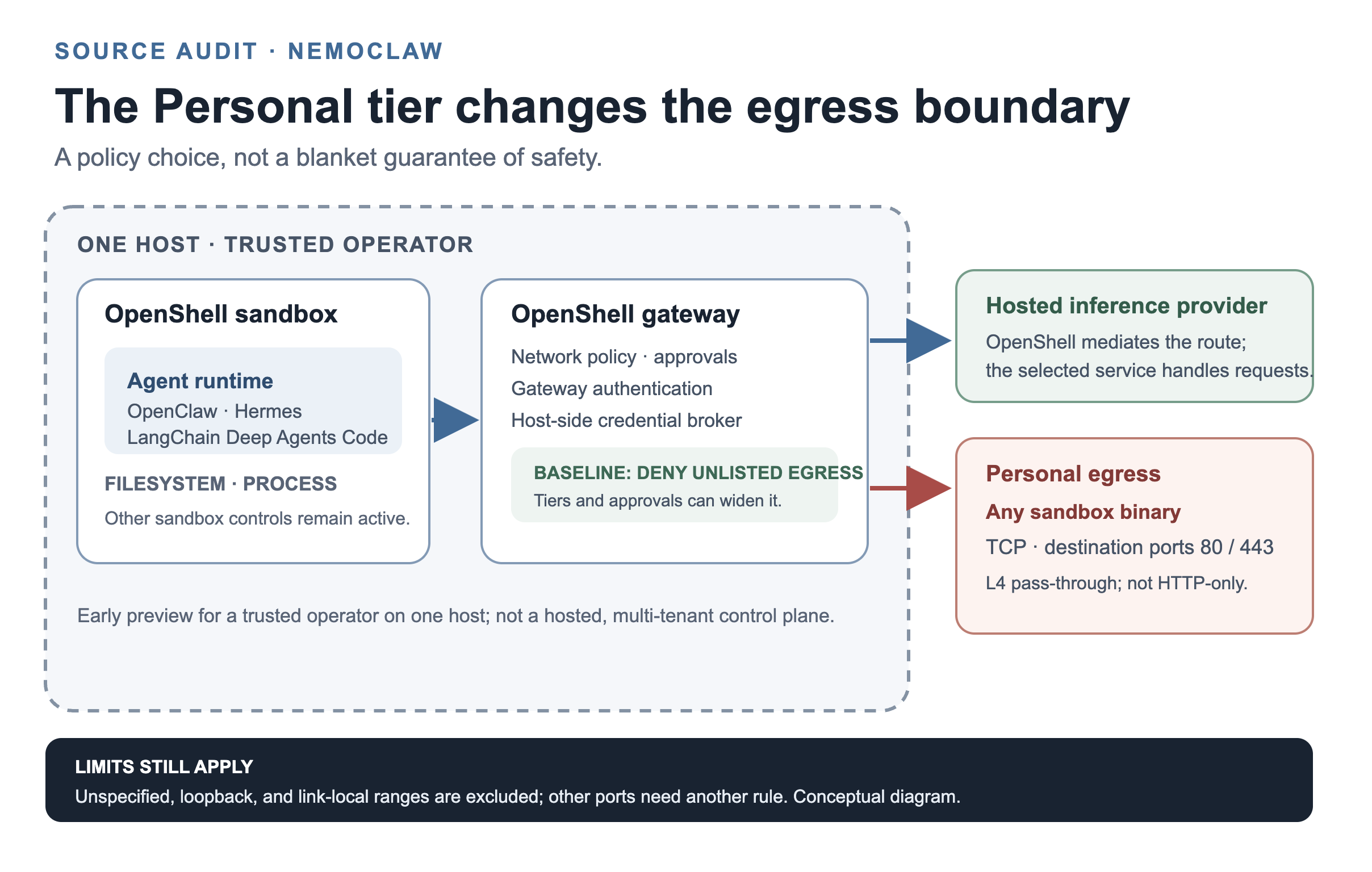
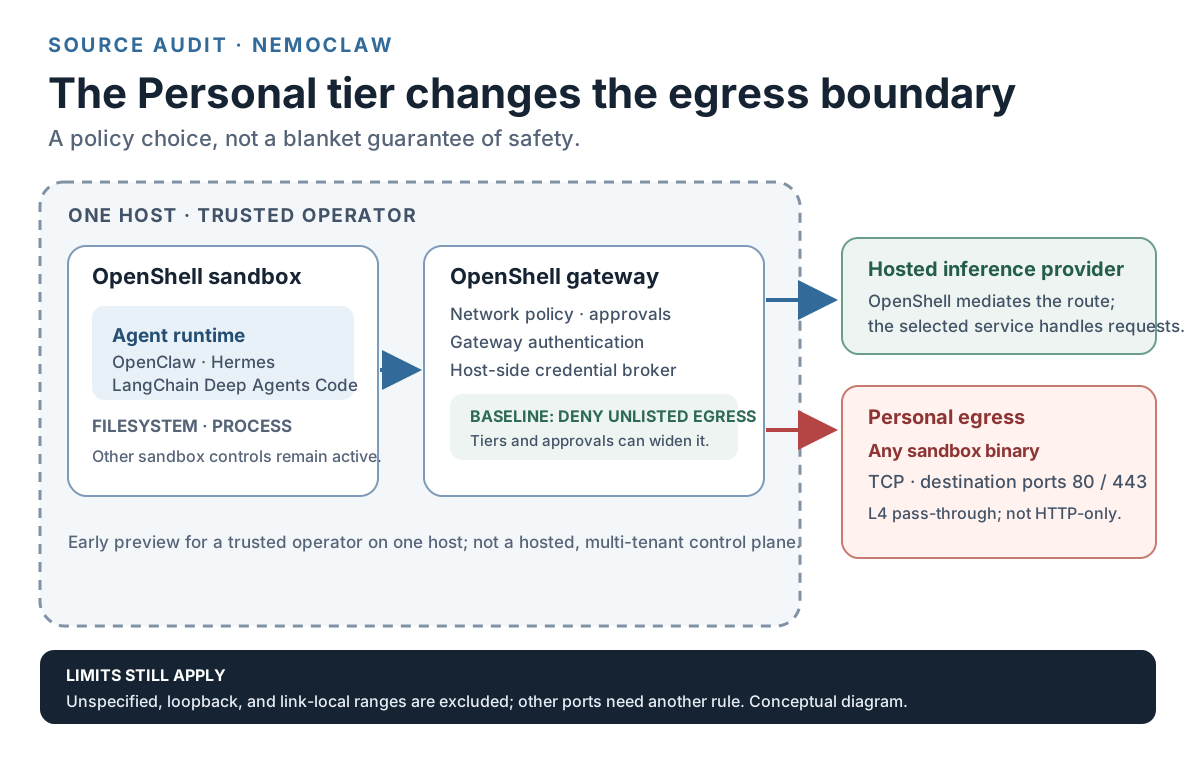
NemoClaw’s Personal tier is broader than browser-style web access. NVIDIA’s current security guide permits every sandbox binary to use TCP on ports 80 and 443 through a Layer 4 path, not an HTTP-only browser gate. The documented address exclusions and other controls matter, so the article separates the precise grant from what remains protected.
That distinction matters before a persistent agent handles prompts, workspace files, webpages, or downloaded packages. A sandbox can have filesystem, process, authentication, and inference controls while still giving its binaries a broad outbound path. The right question is not simply whether NemoClaw is “secure.” It is whether this network posture fits the workload and the data you plan to put inside it.
Editable SVG source is available separately.
What does NemoClaw’s Personal tier actually let an agent connect to?
NVIDIA’s current overview describes NemoClaw as an open-source reference stack that combines a host CLI, a versioned blueprint, agent-specific integration, OpenShell sandboxing, policy enforcement, lifecycle operations, and managed inference. Its current overview lists OpenClaw, Hermes, and LangChain Deep Agents Code as supported agent runtimes. The platform support matrix gives different maturity and platform statuses, so the presence of a runtime in the overview does not mean every runtime-platform combination has the same support level.
The scope is also explicit: the current docs call NemoClaw an early-preview reference stack for a trusted operator on one host. They say it is not a hosted service, a multi-tenant enterprise control plane, or an enterprise identity system. Teams should not treat a successful single-host setup as evidence that it is ready to serve as a shared organizational agent platform.
The platform page labels the project Alpha / Early preview, dated March 16, 2026, and distinguishes statuses such as Tested, Tested with limitations, Experimental, Deferred, Unsupported, and Hermes-only. Check the row for your actual runtime and host before relying on a feature; the headline status is not a substitute for that compatibility check.
Personal is broader than browser-only egress
The security guide describes a deny-by-default network baseline. Only endpoints listed in applicable policy files are allowed, and an operator can approve policy changes that widen the sandbox’s access. Onboarding defaults to Balanced, which selects the npm, pypi, huggingface, and brew-balanced presets. The Locked-Down guidance instead selects Restricted and no web search. Enabling web search adds a Brave or Tavily endpoint, including when Restricted is selected.
The Personal posture selects the personal-open-internet preset while preserving non-web policy. Its network behavior is the important distinction:
| Posture | What NVIDIA’s current guide says | Operator decision |
|---|---|---|
| Restricted | The Locked-Down guidance uses Restricted with no web search. Unlisted endpoints remain outside the selected policy unless approved. | A narrower starting point when broad outbound access is not needed. |
| Balanced | The onboarding default selects npm, pypi, huggingface, and brew-balanced presets. Web search adds a separate Brave or Tavily endpoint. | Keep only the package and search access the task actually needs. |
| Personal | Every sandbox binary may use TCP to public and private address ranges on destination ports 80 and 443. The proxy passes matching traffic at Layer 4 without inspecting hostname, application protocol, method, path, or body. | Treat sandbox-visible data as potentially transmissible over this path. Use only for trusted single-user workloads with trusted prompts and data. |
This is not an unrestricted route to every address and port. The Personal preset excludes unspecified, loopback, and link-local ranges. Other destination ports remain denied unless another policy entry permits them. The guide also says filesystem, process, gateway-authentication, and managed-credential controls remain active. Those controls still matter, but they do not turn the Personal network rule into an HTTP-only allowlist.
The guide says NemoClaw refuses to remove Personal in place because its normalized policy has replaced overlapping web entries. It recommends creating a new Balanced or Restricted sandbox when broad Personal egress is no longer needed. Plan for that recreation and any data or state handoff before you choose the broader posture.
Other control layers change the risk, not the Personal network rule
The current security guide documents five control layers. Some can change at runtime; others are fixed when the sandbox is created or during onboarding.
| Layer | Documented boundary | What to keep separate |
|---|---|---|
| Network | Gateway policy and approvals can change at runtime. | This is where the Personal TCP grant applies. |
| Filesystem | Landlock and mount layout constrain file access; changing the layout requires a new sandbox. | Filesystem limits do not narrow which TCP destinations the Personal preset allows. |
| Process | Process controls are set with the sandbox and require recreation to change. | A process restriction is not a hostname or request-body filter. |
| Gateway authentication | Set during build or onboarding rather than changed as a runtime policy. | Keep the gateway’s authentication boundary distinct from agent egress. |
| Inference | Routing can be changed through the OpenShell gateway. | A managed credential boundary is not the same as keeping prompt data from a hosted provider. |
The inference-routing documentation says raw provider credentials stay outside the sandbox and OpenShell mediates the provider route. The selected hosted service still receives and processes the request under its own policies. Custom and local providers use the shared inference.local route in the documented setup. Choose the provider and its data handling separately from the network preset; credential isolation does not mean the request itself stays local.
The current setup guide is not a safety guarantee
The current quickstart points to the installer at www.nvidia.com/nemoclaw.sh and describes an interactive path for choosing an agent runtime and setting up the sandbox. The prerequisites page lists Node.js 22.19 or later, npm 10 or later, and Docker as the default runtime path. Its minimum host specification is 4 vCPU, 8 GB RAM, and 20 GB disk. These are current documentation requirements, not results from an installation in this review.
A setup checklist cannot answer the policy question for you. Before placing a sensitive or always-on workload in a sandbox, verify the actual host and runtime row in the platform matrix, decide whether its required destinations justify a specific preset, and identify which provider will receive inference requests. Do not infer from “sandboxed” that network data is private from a selected hosted provider or that the runtime is a multi-user service.
What changed since March 2026
The restored March article framed NemoClaw as OpenClaw-only, asserted a fresh OpenClaw installation was required, and included unversioned plugin and ask commands as a smoke test. The current overview lists Hermes and LangChain Deep Agents Code as well as OpenClaw. The current quickstart and prerequisite pages reviewed here do not establish a universal fresh-install requirement, so I removed that claim rather than turn a missing instruction into a compatibility guarantee. I also replaced the old installer hostname with the current quickstart link and did not retain those old commands as verified NemoClaw checks.
The wording around “self-evolving” needs the same scope check. NVIDIA’s Hermes/NemoClaw technical article describes a Hermes agent using Nous Research’s skills-and-memory loop alongside OpenShell controls. That supports a Hermes-specific learning integration; it does not show that NemoClaw makes every supported agent self-improve. NemoClaw’s role in the example is the runtime and policy layer around the agent.
The current platform page still describes an Alpha / Early preview. Read that as a warning to check maturity, host support, and lifecycle behavior, not as proof that every part is unusable or that the product is ready for shared production use.
A decision checklist before choosing Personal
- Does the task really need broad TCP access on ports 80 and 443, or would a package preset, a narrow endpoint list, or an explicit approval meet the need?
- What information can enter the sandbox through prompts, files, webpages, or downloaded packages? NVIDIA’s own Personal guidance says to treat those inputs as able to trigger external TCP traffic.
- Is this a trusted single-user workload on one host? The current product scope does not describe a hosted or multi-tenant service.
- If broad egress is temporary, can you create a new Balanced or Restricted sandbox and move the needed state when you are done?
- Which inference provider receives the request, and what is its data policy? Managed credentials outside the sandbox do not answer that question.
For a separate audit of how policy-change approvals are evaluated, read the OpenShell auto-approval review. The OpenHarness permission-order audit covers a different enforcement boundary. Neither is evidence for NemoClaw’s Personal preset; they are context for checking the exact policy mechanism rather than relying on a broad label such as “approval” or “sandbox.”
Key Takeaways
- Personal is not browser-only: any sandbox binary can use TCP on destination ports 80 and 443 to eligible public and private ranges through Layer 4 pass-through.
- Unspecified, loopback, and link-local ranges remain excluded, and other ports need another policy entry. Filesystem, process, gateway-authentication, and inference controls remain separate.
- NVIDIA scopes the current preview to a trusted operator on one host. Its docs recommend a new Balanced or Restricted sandbox when leaving Personal.
- A managed inference route keeps raw provider credentials outside the sandbox, but the selected provider still processes the request.
- “Self-improving” is supported here as a Hermes-specific skills-and-memory integration, not a general NemoClaw capability.
New Questions
What narrower, auditable policy option would let an agent reach the specific web services it needs without giving every sandbox binary the Personal tier’s TCP path?
References
Current NVIDIA documentation
- NemoClaw Security Posture and Control Trade-Offs - egress presets, exclusions, and the five control layers; observed as of 2026-10-15.
- NemoClaw overview - current product scope and agent runtimes; observed as of 2026-10-15.
- Inference routing - managed, custom, and local provider paths; observed as of 2026-10-15.
- Platform support matrix - preview status and runtime-platform maturity; observed as of 2026-10-15.
- Prerequisites and Quickstart - current requirements and onboarding path; observed as of 2026-10-15.
NVIDIA product materials
- NVIDIA NemoClaw product page - current product description and supported blueprint examples; observed as of 2026-10-15.
- Deploy self-evolving agents for faster, more secure research with a Hermes agent and NVIDIA NemoClaw - Hermes-specific skills-and-memory integration; observed as of 2026-10-15.
Editorial method: claims in this article point to primary documentation, pinned source code, runnable checks, or dated measurements, with AI-assisted research under the site's evidence-gated policy. How this site verifies claims and discloses AI assistance · Report a correction.
Working on something like this?
I take a small number of paid, scoped reviews: AI agent/RAG architecture diagnosis, Unity CI & build-automation audits, and multimodal QA design review. Each one ends in a written findings document.
Work with me