AI
MCP for Unity Ships a Drift Check No Workflow Ever Runs
Source Audit of CoplayDev/unity-mcp: the script built to stop stale release notes ships a –check mode no workflow runs, and its two files sit four releases behind.
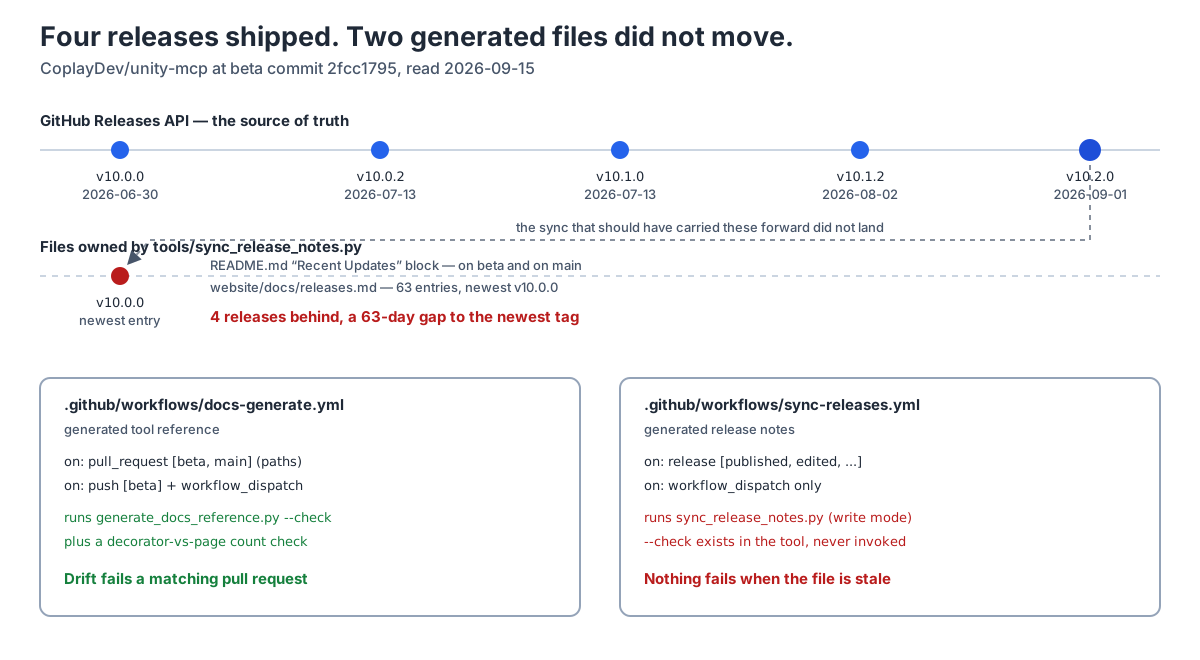
Which version string in this repository is load-bearing?
CoplayDev/unity-mcp is a widely adopted Unity MCP bridge. It is MIT-licensed, created 2025-03-18, and at retrieval it carried 14,221 stars and 1,493 forks, far ahead of the other Unity Editor MCP servers I found while scoping this audit, the largest of which carried 243. It advertises “47 focused MCP tool entrypoints, any client, free & MIT” and is explicit that it “is not affiliated with Unity Technologies.”
If you are wiring this into a game-production pipeline, the first practical question is not what the tools do. It is which version you are actually installing, because the Package Manager git URL in the Quickstart is the line a new user copies first.
I went looking for that answer and found five places that give one. They do not all agree.
The GitHub Releases API says the newest release is v10.2.0, published 2026-09-01. The Unity package manifest says 10.2.0 on main and 10.2.1-beta.6 on beta. The README’s machine-maintained “Recent Updates” block says the newest release is v10.0.0 from 2026-06-30. And the README’s own install line, one screen below that block, tells you to pin #v10.0.0 and calls it “this release.”
Four releases shipped in between: v10.0.2 and v10.1.0 on 2026-07-13, v10.1.2 on 2026-08-02, and v10.2.0 on 2026-09-01.
That is a 63-day gap between what the documentation calls current and what the project actually shipped. The interesting part is not the gap. It is that this repository already built the machine to prevent it, and then built a second one that works.
Technical Analysis: Reading the generator, then the workflow that runs it
The stale block is generated, not written
The “Recent Updates” list is not prose someone forgot to update. It sits between two sentinels, <!-- recent-updates:start --> and <!-- recent-updates:end -->, and it is one of two artifacts owned by tools/sync_release_notes.py. The other is website/docs/releases.md, which carries this header:
Auto-generated from the GitHub Releases API by
tools/sync_release_notes.py. Do not hand-edit — changes will be overwritten on the next sync.
At the audited commit that file is 83,870 bytes and holds 63 release entries. Its newest is ### [v10.0.0](...) — 2026-06-30, under a final series heading of ## v10.0 series. Both generated surfaces are stale in exactly the same place, and the README block is stale identically on beta and on main.
The script exists because this already happened once
The generator’s own module docstring explains why it was written:
Why a sync script: the previous releases.md was hand-maintained and went stale (it claimed v9.6.3 was latest when v9.7.0 had shipped). GitHub Releases is the single source of truth; this script makes it the only source.
That is the whole argument for automating the file, and it is a good one. The previous failure was one minor version of drift. The automated replacement is now four releases behind.
The script also ships the tool that would have caught it. Its documented usage block lists two modes:
1
2
python tools/sync_release_notes.py                # write + verify
python tools/sync_release_notes.py --check        # CI: fail if drift
--check is described, in the project’s own words, as the CI mode that fails on drift.
Nothing calls it
.github/workflows/sync-releases.yml is the only workflow that touches the script. It runs python tools/sync_release_notes.py — write mode, no flag — and it fires on a deliberately narrow trigger set:
1
2
3
4
on:
  release:
    types: [published, edited, unpublished, deleted]
  workflow_dispatch: {}
The workflow’s header comment is unusually candid about why, and it is the sentence the artifact contradicts:
release.published / edited / unpublished / deleted: the only time the synced files can legitimately go stale.
It then rules out the two triggers that would have caught this:
Why no pull_request / schedule triggers: … drift can’t logically be introduced by a PR that the workflow couldn’t already handle on release.
and
A daily cron would mask the source-of-truth (release events) and produce mystery commits unattached to a release.
Both arguments are coherent. Both assume the release-triggered job succeeds. When it does not, there is no second chance: no cron to retry, no pull-request gate to notice, and --check sitting unused in a script the workflow already invokes.
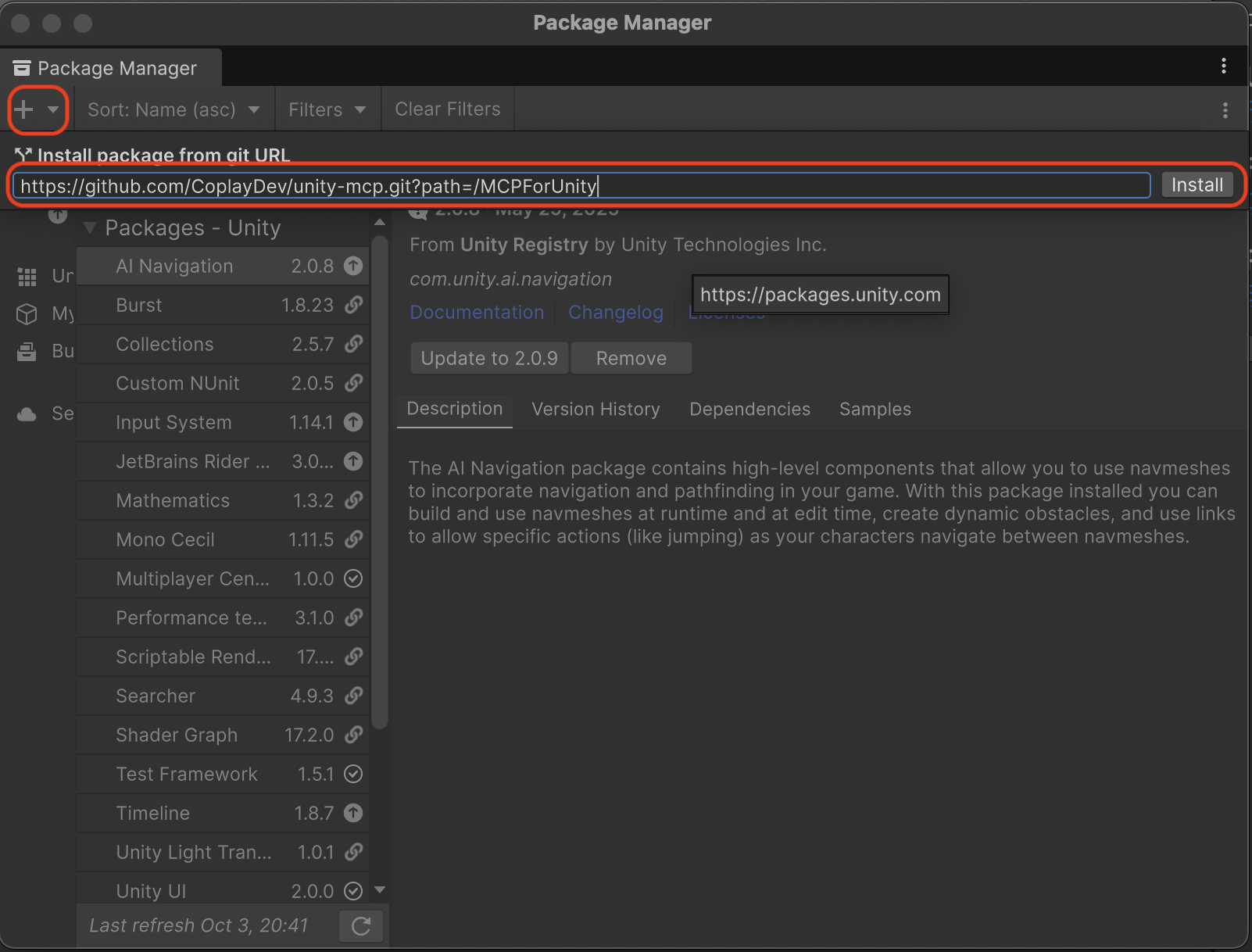
beta, not main — Image from CoplayDev/unity-mcp (MIT), commit 2fcc1795. Source: https://github.com/CoplayDev/unity-mcp/blob/2fcc17957823f2494b7b1f7ade92c0fb56f4adb1/docs/images/v5_02_install.png. Publisher: CoplayDev (CoplayDev/unity-mcp). Licence: MIT.
The same repository already solved this, one workflow over
.github/workflows/docs-generate.yml owns the other generated documentation surface, the tool reference. It is titled “Docs — Reference Drift Check”, and it is built the opposite way:
1
2
3
4
5
6
on:
  pull_request:
    branches: [beta, main]
  push:
    branches: [beta]
  workflow_dispatch: {}
Its drift step runs uv run python ../tools/generate_docs_reference.py --check. Then it adds a second, cruder gate: count @mcp_for_unity_tool decorators, count generated reference pages, and exit non-zero if the two disagree.
So the repository holds two generated-documentation pipelines side by side. One is gated on pull requests that touch its inputs or its output, and cross-checked by a second independent count. The other is a fire-and-forget writer whose drift detector is never invoked. The ungated one is the one that is four releases behind. I did not independently regenerate the tool reference, so I am comparing the strength of the two gates, not certifying that the gated output is currently perfect.
Why the sync may not be landing
The observable fact is the drift. The cause is not fully observable from outside, and I will not pretend otherwise.
What is visible: beta and main are both protected branches, and the sync job checks out beta with persist-credentials: true and the default GITHUB_TOKEN, then runs git push origin beta. A protected branch that requires pull requests or reviews would reject exactly that push. That is a plausible mechanism and nothing more — the specific protection rules are not readable without repository administration access, so I record it as inferred, not verified.
The audit does not depend on the cause. A generated file that silently stops regenerating is a problem whatever the reason, and --check in CI would have surfaced it on the next pull request regardless of which mechanism broke the push.
The documentation images are an independent age record
The screenshots shipped under docs/images/ date the same surface a second way, without needing the git history.
The Advanced Settings panel — the screen SECURITY.md points at for the “Allow LAN Bind (HTTP Local)” opt-in — reports Version: v8.2.1 in its header, and its remote-server example is pinned to @v6.3.0.
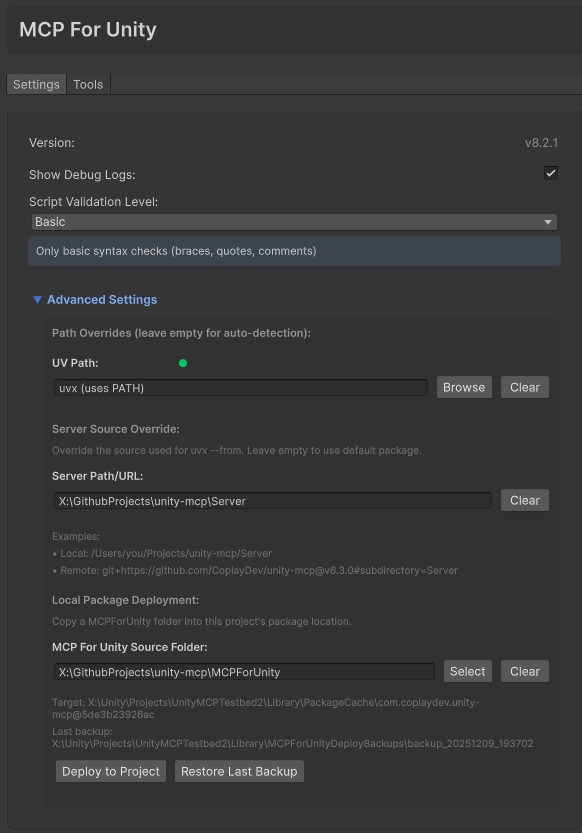
@v6.3.0 — Image from CoplayDev/unity-mcp (MIT), commit 2fcc1795. Source: https://github.com/CoplayDev/unity-mcp/blob/2fcc17957823f2494b7b1f7ade92c0fb56f4adb1/docs/images/advanced-setting.png. Publisher: CoplayDev (CoplayDev/unity-mcp). Licence: MIT.
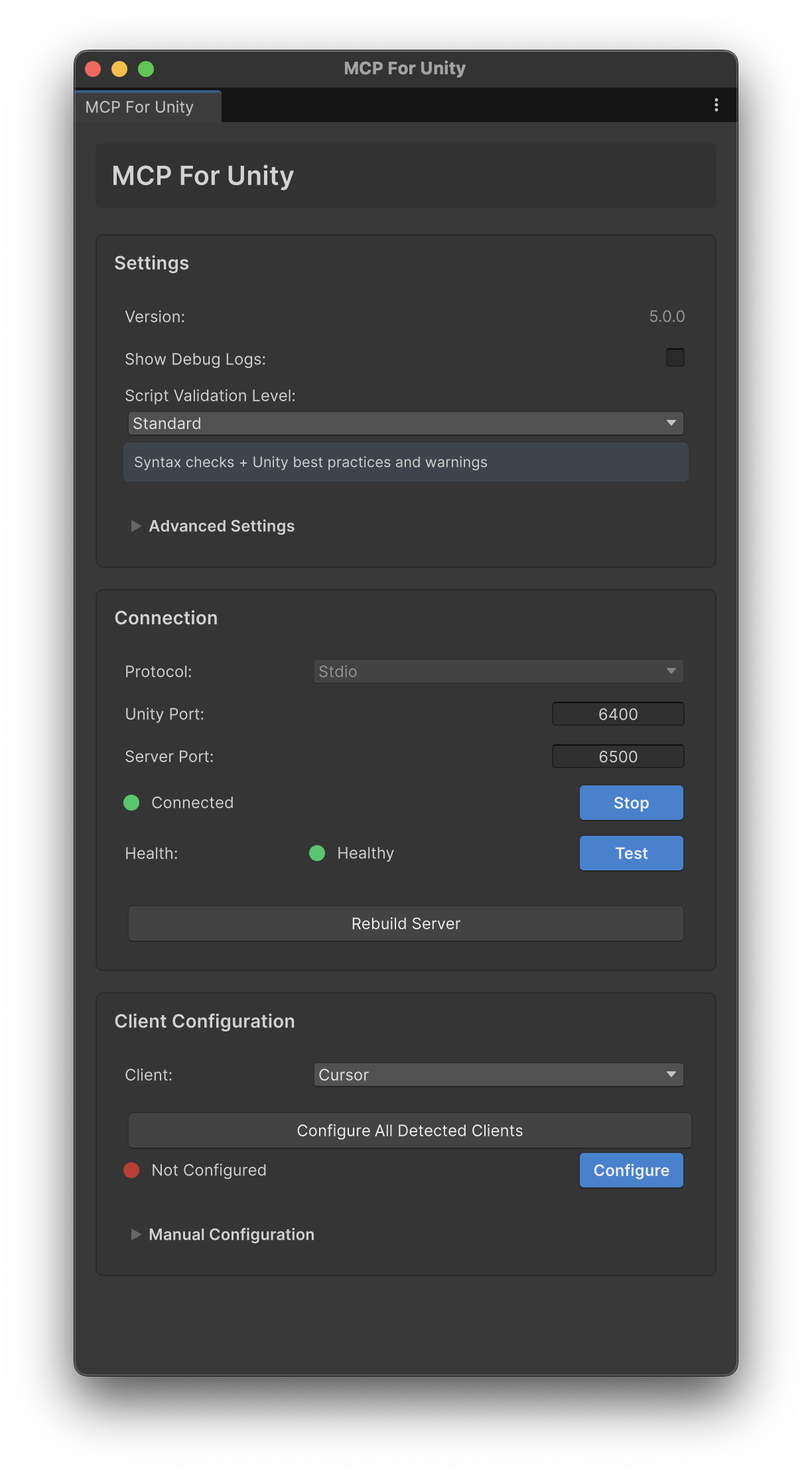
The file named v6_new_ui_dark.png shows a window reporting Version 5.0.0, on a Stdio protocol with Unity port 6400 and server port 6500. I report what the pixels show; which of the filename and the window is the intended label is not something the tree settles.

The oldest is the most striking. The uninstall screenshot shows MCP for Unity 2.1.2, installed from a git URL whose path parameter is /UnityMcpBridge — a subdirectory the current install line no longer uses, since the README now points at /MCPForUnity. A reader following the pictures and a reader following the text are installing from different paths.
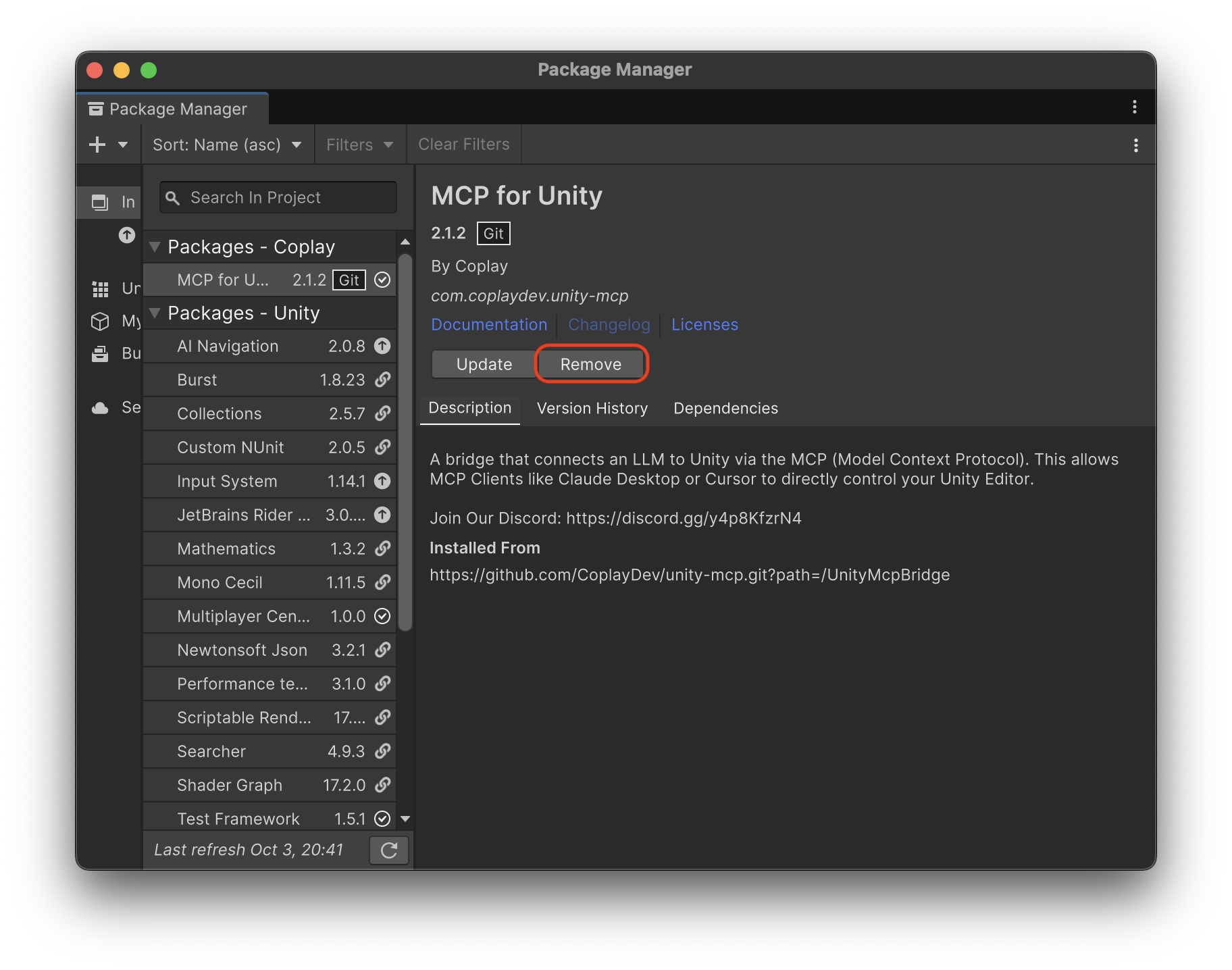
/UnityMcpBridge path parameter — Image from CoplayDev/unity-mcp (MIT), commit 2fcc1795. Source: https://github.com/CoplayDev/unity-mcp/blob/2fcc17957823f2494b7b1f7ade92c0fb56f4adb1/docs/images/v5_01_uninstall.png. Publisher: CoplayDev (CoplayDev/unity-mcp). Licence: MIT.
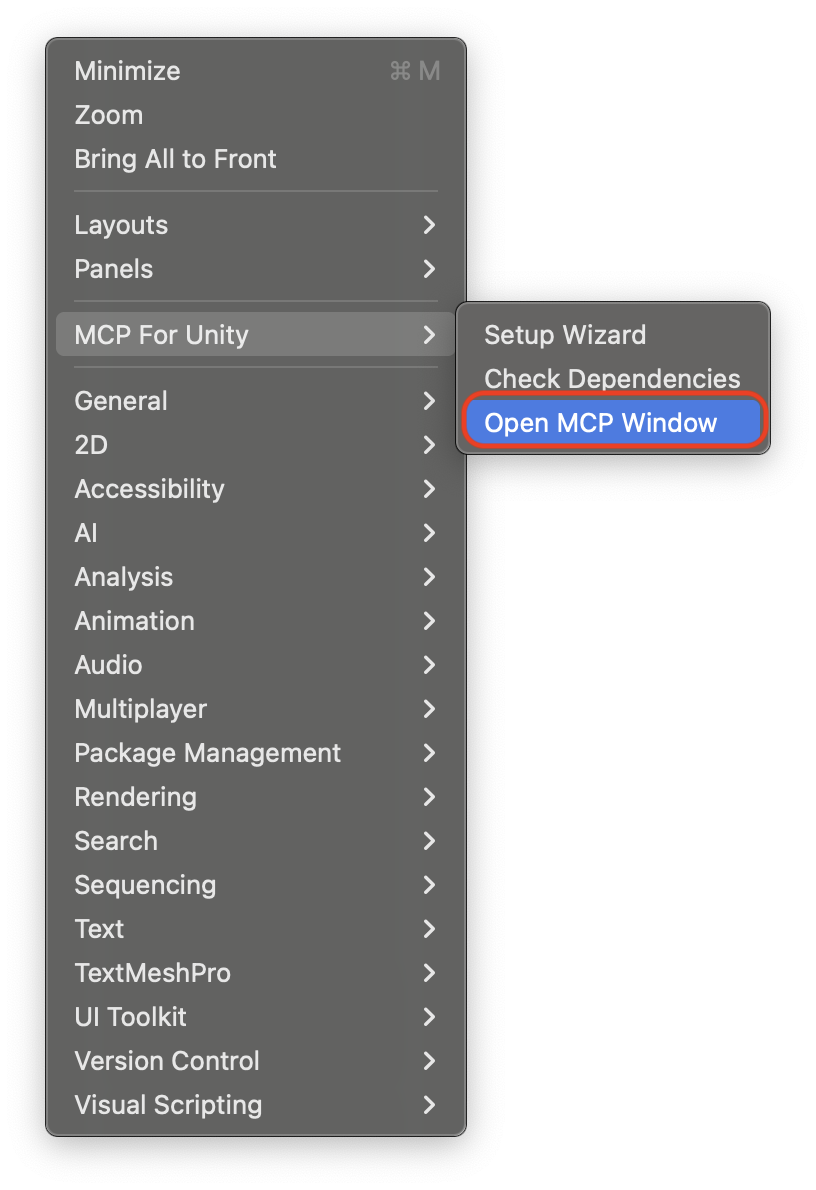
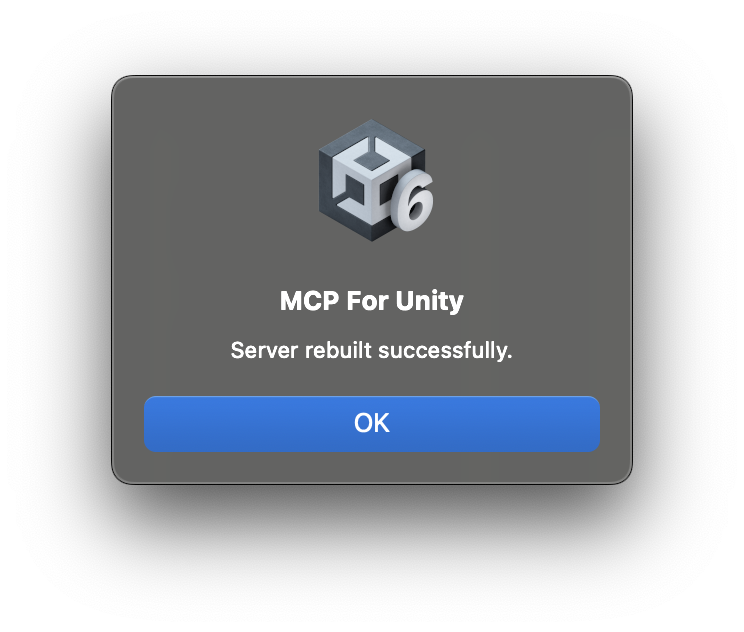
The rest of that flow is intact and still useful — the menu path and the rebuild confirmation have not changed shape.


Where this actually bites
The drift is not cosmetic, because the same repository publishes a support policy keyed to versions. SECURITY.md supports exactly two things:
| Version | Supported |
|---|---|
latest (main) | Yes |
latest beta (beta) | Yes |
| older releases | No — please upgrade |
The README tells you to pin #v10.0.0. By the table above, that pin is an older release, and older releases are not supported. The install instruction and the security policy give opposite advice, and neither one is wrong on its own terms — the README line simply froze while the policy stayed general.
There is a second-order effect on the default path too. The documented install URL ends in #main, but the screenshot that illustrates it carries no fragment at all, and the repository’s default branch is beta. A fragment-less git URL resolves the default branch, so the picture installs a prerelease line — 10.2.1-beta.6 at the audited commit — while the text installs the stable one.
A generator without a gate is just a slower hand-edit
The useful lesson here is not “this project has stale docs.” It is that the project correctly diagnosed the problem, built the right tool, and then wired it into the wrong shape — and that the correct shape was already sitting in the same .github/workflows/ directory.
Generated artifacts fail differently from hand-written ones. A hand-written file goes stale visibly: someone reads it, notices, and fixes it. A generated file goes stale invisibly, because everyone downstream assumes the generator ran. The header that says “Do not hand-edit — changes will be overwritten on the next sync” actively discourages the human correction that used to be the backstop. Automation removed the old failure mode and installed a quieter one.
That gives a rule worth carrying into any repository that generates documentation from a source of truth:
An event-triggered writer is not a guarantee. Only a check that runs on a different schedule than the writer is a guarantee.
The two workflows here sit on opposite sides of that rule. docs-generate.yml verifies on pull requests — a different event from the one that regenerates the reference — so drift has a standing chance to fail something a human is already looking at. sync-releases.yml verifies on the same event that writes, which means a failed write and a failed verify are the same failure. The surface with the independent check is not the one sitting four releases behind. The --check flag was already built. It needed one more workflow, triggered by anything other than a release, to become a gate instead of a comment.
The same question turns up whenever a repository publishes a signal about its own state. I asked a version of it about a CI badge in the mjlab source audit: what a green marker in a repository actually proves about the path a real user will take. Here the marker is a version number, and the answer is the same — it proves what it was last told, not what is true.
For a Unity team adopting this bridge, the practical takeaways are small and concrete. Pin deliberately rather than copying the parenthetical: at the audited commit the supported stable line is v10.2.0, not the v10.0.0 the README suggests. Read the GitHub Releases tab rather than releases.md or the README block, since that is the source of truth all three are supposed to reflect. And treat the documentation screenshots as historical — they span 2.1.2 through v8.2.1 and at least one of them uses a path parameter that no longer exists.
None of this makes the project unsafe or unserious. It is MIT, it moves fast, its security policy is specific about fail-closed network defaults, and its tool-reference pipeline is better gated than most repositories manage. That is exactly what makes the gap legible: the standard applied to one generated file is visibly higher than the standard applied to the other.
Key Takeaways
- At beta commit
2fcc1795, the newest release is v10.2.0 (2026-09-01), while the README “Recent Updates” block andwebsite/docs/releases.mdboth stop at v10.0.0 (2026-06-30) — four releases and a 63-day gap. tools/sync_release_notes.pywas written specifically because a hand-maintainedreleases.mdwent stale by one minor version. The automated replacement is now four releases stale.- The script documents a
--checkmode as “CI: fail if drift”. No workflow in the repository invokes it. docs-generate.ymlruns its sibling generator with--checkon pull requests tobetaandmainthat touch the tool registry, the generated reference or the generator itself, plus a decorator-versus-page count check. That surface has a gate; the stale one does not.sync-releases.ymlfires only on release events andworkflow_dispatch, runs the script in write mode, and pushes to a protected branch. Its own comment calls release events “the only time the synced files can legitimately go stale.”- The README says to
pin #v10.0.0;SECURITY.mdsays older releases are not supported. Both statements are live at the same commit.
New Questions This Raises
- If the sync push is being rejected by branch protection, does the workflow surface a red run, or does it fail in a way maintainers have learned to scroll past?
- Is there a general rule for when a generated artifact needs a verifier on an independent trigger — or should every
--checkflag ship with a mandatory second workflow by convention? - OpenUPM installs bypass the git URL entirely. Does the registry version track
main, and does that make the README’s git-URL advice the least reliable of the available install paths? - How many other high-star repositories carry a documented drift-check flag that no pipeline calls?
Limitations
This audit reads public artifacts only. I did not run the Unity Editor, install the package, execute the MCP server, or observe the sync workflow’s run history, so the cause of the missing sync is explicitly marked inferred rather than verified — branch protection is one plausible mechanism among several, and the protection rules themselves are not publicly readable. Star and fork counts are point-in-time. The version and date claims are pinned to 2fcc1795 on beta and 30d22075 on main and will age: a single successful sync run would close the documentation gap described here, which is the outcome this audit would like to be wrong about. Statements about the project’s network defaults are quoted from SECURITY.md and were not independently exercised.
References
Primary — repository at pinned commit
- CoplayDev/unity-mcp at
2fcc1795 README.md— Quickstart install line, Recent Updates sentinel blockSECURITY.md— Supported Versions table, network defaultstools/sync_release_notes.py— rationale docstring,--checkusage.github/workflows/sync-releases.yml— trigger set, write-mode invocation.github/workflows/docs-generate.yml—--checkdrift gate, tool-count sanity stepwebsite/docs/releases.md— generated release historyMCPForUnity/package.json— package version onbetaLICENSE— MIT, basis for image reuse
Primary — official API
- Repository object — default branch, licence, counts, timestamps
- Latest release — v10.2.0
- Release list — release dates and targets
- Branch list — protection flags
Related reading on this site
Editorial method: claims in this article point to primary documentation, pinned source code, runnable checks, or dated measurements, with AI-assisted research under the site's evidence-gated policy. How this site verifies claims and discloses AI assistance · Report a correction.
Working on something like this?
I take a small number of paid, scoped reviews: AI agent/RAG architecture diagnosis, Unity CI & build-automation audits, and multimodal QA design review. Each one ends in a written findings document.
Work with me